[root@vastbase~]# timedatectl Local time:Mon2025-06-09 13:46:36 CST Universal time:Mon2025-06-09 05:46:36 UTC RTC time:Mon2025-06-09 05:46:36 Time zone:Asia/Shanghai(CST,+0800) System clock synchronized:no NTP service:inactive RTC in local TZ:no
[root@vastbase ~]# grub2-mkconfig -o /boot/grub2/grub.cfg Generating grub configuration file ... Found linux image:/boot/vmlinuz-5.10.0-182.0.0.95.oe2203sp3.x86_64 Found initrd image:/boot/initramfs-5.10.0-182.0.0.95.oe2203sp3.x86_64.img Found linux image:/boot/vmlinuz-0-rescue-39cd0fedff3b4d4ea197a52f0c9a6794 Found initrd image:/boot/initramfs-0-rescue-39cd0fedff3b4d4ea197a52f0c9a6794.img Adding boot menu entry for UEFI Firmware Settings ... done
cat<<-EOF>>/etc/security/limits.conf vastbase soft nproc unlimited vastbase hard nproc unlimited vastbase soft stack unlimited vastbase hard stack unlimited vastbase soft core unlimited vastbase hard core unlimited vastbase soft memlock unlimited vastbase hard memlock unlimited vastbase soft nofile 1024000 vastbase hard nofile 1024000 EOF
创建用户
如果有密码复杂性要求,不想设置密码太复杂的话,可以取消密码复杂度:
1 2
[root@vastbase~]# sed -i 's/^password\+[[:space:]]\+requisite[[:space:]]\+pam_pwquality.so/#&/g' /etc/pam.d/system-auth [root@vastbase~]# sed -i 's/use_authtok$//' /etc/pam.d/system-auth
------------------ Preparing the installation environment...
Finish to prepare the installation environment =============================================================================== IPC parameter check ---------------
The IPC parameter check is complete =============================================================================== Install database ---------------
Whether to instantiate the database (Y/N): Y
Select installation type
Typical installation : Use default parameters to init database Custom installation : Configure installation parameters and functions manually
-> 1- Typical installation 2- Custom installation
Select the installation type, or type <Enter> to select the default (1): 2 =============================================================================== Database Initialization User Password (Press the backspace key to go back) ---------------
Enter the password of database initialization user (vastbase): ***********
-> 1- Use the database initialization password (default) 2- Enter the encryption key manually
Select the database encryption key setting, or type <Enter> to select the default(1): =============================================================================== Vastbase installation directory ---------------
Select the database initialization directory Default location: /home/vastbase/data/vastbase
Type the absolute path (ctrl+ backspace to backspace), or type <Enter> to use the default path : /vastdata/data/vastbase =============================================================================== listener port ---------------
Enter the listening port, or type <Enter> to select the default (5432):
=============================================================================== Max Connections ---------------
Enter the maximum number of client connections, or type <Enter> to select the default (500): 1500 =============================================================================== Shared buffers ---------------
Enter the shared memory size in MB, or enter <Enter> to select the default (3871):
Specify the database compatibility mode (A|B|PG|MSSQL)
Default compatibility:A
Type compatibility above or <Enter> to use the default value
=============================================================================== Check disk IO scheduling algorithm ---------------
The disk IO scheduling algorithm to which directory /vastdata/data/vastbase belongs is being checked
The scheduling algorithm of disk IO is checked =============================================================================== Installation summary ---------------
Installation underway, please wait... Initialize database successfully, data directory :/vastdata/data/vastbase
The default passwords of the three default database administrators vbaudit, vbsso, and vbadmin are: system admin[vbadmin] initial password: C58d6(6f security admin[vbsso] initial password: Cf4f4(89 audit admin[vbaudit] initial password: X2b15!5c
Generate the encryption key file The encryption key file is generated successfully
The configuration file /vastdata/data/vastbase/postgresql.conf was successfully updated
Writing configuration file
Writing cluster_config.xml file
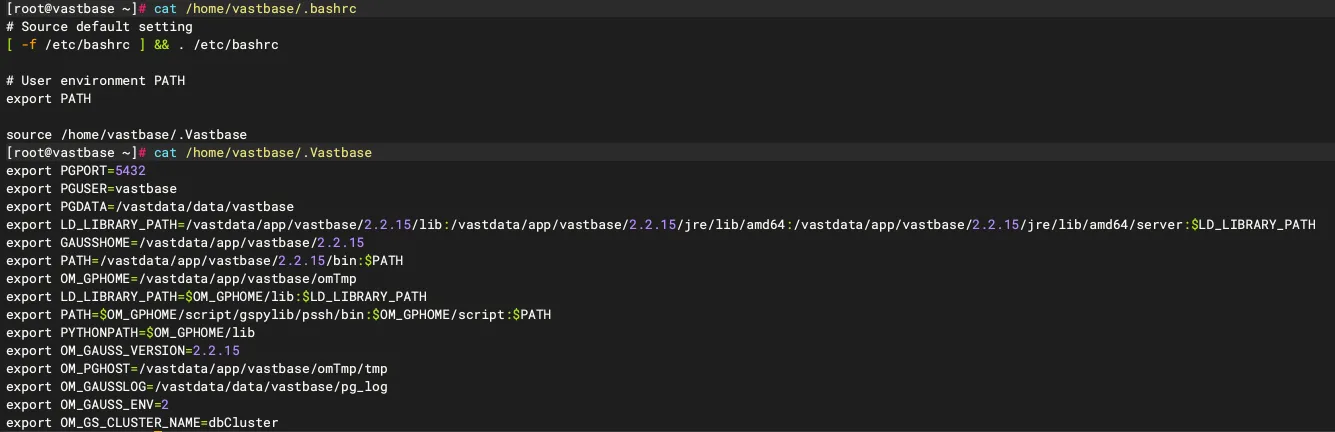
Writing environment variables The configuration file:'/home/vastbase/.bashrc' is successfully updated =============================================================================== Installation complete ---------------
Specify the license path first (if the license path is incorrect, the database fails to start): Write the license path to file /vastdata/data/vastbase/postgresql.conf in the form of license_path='license path'
To initialize the database running environment: source ~/.bashrc
To start, stop, and restart the database: vb_ctl <start/stop/restart>
If the installation is complete, Enter <Enter> to exit:
[vastbase@vastbase:/home/vastbase]$ source ~/.bashrc [vastbase@vastbase:/home/vastbase]$ vb_ctl status [2025-06-0914:49:10.434][8567][][vb_ctl]: vb_ctl status,datadir is /vastdata/data/vastbase no server running
启动数据库报错:
1 2 3 4 5 6 7 8 9 10 11 12 13 14 15 16 17 18 19
[vastbase@vastbase:/home/vastbase]$ vb_ctl start [2025-06-09 14:55:36.611][9962][][vb_ctl]: vb_ctl started,datadir is /vastdata/data/vastbase [2025-06-09 14:55:36.664][9962][][vb_ctl]: waiting for server to start...
... ... ...
2025-06-09 14:55:36.781 [unknown][unknown] localhost 139661589746176 0[0:0#0] 0 [BACKEND] LOG: reserved memory for backend threads is: 220 MB 2025-06-09 14:55:36.781 [unknown][unknown] localhost 139661589746176 0[0:0#0] 0 [BACKEND] LOG: reserved memory for WAL buffers is: 128 MB 2025-06-09 14:55:36.781 [unknown][unknown] localhost 139661589746176 0[0:0#0] 0 [BACKEND] LOG: Set max backend reserve memory is: 348 MB, max dynamic memory is: 1917 MB 2025-06-09 14:55:36.781 [unknown][unknown] localhost 139661589746176 0[0:0#0] 0 [BACKEND] LOG: shared memory 7519 Mbytes, memory context 2265 Mbytes, max process memory 10297 Mbytes 2025-06-09 14:55:36.781 [unknown][unknown] localhost 139661589746176 0[0:0#0] 0 [BACKEND] FATAL: the values of memory out of limit, the database failed to be started, max_process_memory (10297MB) must greater than 2GB + cstore_buffers(512MB) + (udf_memory_limit(200MB) - UDF_DEFAULT_MEMORY(200MB)) + shared_buffers(3871MB) + preserved memory(3996MB) = 10427MB, reduce the value of shared_buffers, max_pred_locks_per_transaction, max_connection, wal_buffers, max_wal_senders, wal_receiver_buffer_size..etc will help reduce the size of preserved memory 2025-06-09 14:55:36.784 [unknown][unknown] localhost 139661589746176 0[0:0#0] 0 [BACKEND] LOG: FiniNuma allocIndex: 0. [2025-06-09 14:55:37.666][9962][][vb_ctl]: waitpid 9965 failed, exitstatus is 256, ret is 2
[2025-06-09 14:55:37.666][9962][][vb_ctl]: stopped waiting [2025-06-09 14:55:37.666][9962][][vb_ctl]: could not start server Examine the log output.
[vastbase@vastbase:/home/vastbase]$ vb_ctl start [2025-06-0915:01:37.346][10751][][vb_ctl]: vb_ctl started,datadir is /vastdata/data/vastbase [2025-06-0915:01:37.403][10751][][vb_ctl]: waiting for server to start...
[2025-06-0915:01:38.416][10751][][vb_ctl]: done [2025-06-0915:01:38.416][10751][][vb_ctl]: server started (/vastdata/data/vastbase)
启动成功,查看数据库状态:
1
2
3
4
[vastbase@vastbase:/home/vastbase]$ vb_ctl status [2025-06-0915:01:54.074][10919][][vb_ctl]: vb_ctl status,datadir is/vastdata/data/vastbase vb_ctl: server is running (PID: 10754) /vastdata/app/vastbase/2.2.15/bin/vastbase
[vastbase@vastbase:/home/vastbase]$ vb_ctl restart [2025-06-0915:06:32.159][11502][][vb_ctl]: vb_ctl restarted ,datadir is /vastdata/data/vastbase waiting for server to shut down... done server stopped