大家好,这里是 DBA学习之路 ,专注于提升数据库运维效率。
前言 前几天看到 Debian 出了 12.10 版本,今天周末手痒就用脚本测了一把一键安装 Oracle,没想到安装很顺利,只花了 5 分钟左右。至于为什么要选 ARM 版本,是因为我的电脑是 ARM 芯片,所以只能安装 ARM 版本的操作系统了,Oracle 也就只能选择 19C 版本,
本文就演示一下我如何在 Debian 12.10(ARM)安装 Oracle 19C 单机版过程。
脚本介绍 作为一名 Oracle DBA,工作中无可避免的需要安装部署 Oracle 数据库,例如生产建库,恢复测试,容灾搭建等等。众所周知,Oracle 从零开始安装部署一套数据库需要花费大量的时间和精力。往往有时候因为粗心敲错代码就导致安装部署失败的情况时有发生。
目前已经部分开源,可以应对大部分安装工作,大家可自行试用!
脚本下载地址 :https://gitee.com/luciferlpc/OracleShellInstall
PS:不好用,青学会会长倒立洗头!
一键安装 使用脚本安装前,首先需要自行安装好操作系统(包括网络的配置),然后上传 Oracle 软件即可执行安装。
环境信息 这里我大概列一下我的环境信息:
1 2 3 4 5 6 7 8 9 10 11 12 13 14 15 16 17 18 19 20 21 22 23 24 25 26 27 28 29 30 31 32 33 34 35 36 37 PRETTY_NAME ="Debian GNU/Linux 12 (bookworm)" NAME ="Debian GNU/Linux" VERSION_ID ="12" VERSION ="12 (bookworm)" VERSION_CODENAME =bookwormID =debianHOME_URL ="https://www.debian.org/" SUPPORT_URL ="https://www.debian.org/support" BUG_REPORT_URL ="https://bugs.debian.org/" ip a group default qlen 1000 ping www.baidu.comPING www.a.shifen.com (180.101.51.73) 56(84) bytes of data.from 180.101.51.73 (180.101.51.73): icmp_seq =1 ttl =128 time =11.4 msfrom 180.101.51.73 (180.101.51.73): icmp_seq =2 ttl =128 time =31.7 msfrom 180.101.51.73 (180.101.51.73): icmp_seq =3 ttl =128 time =77.8 ms
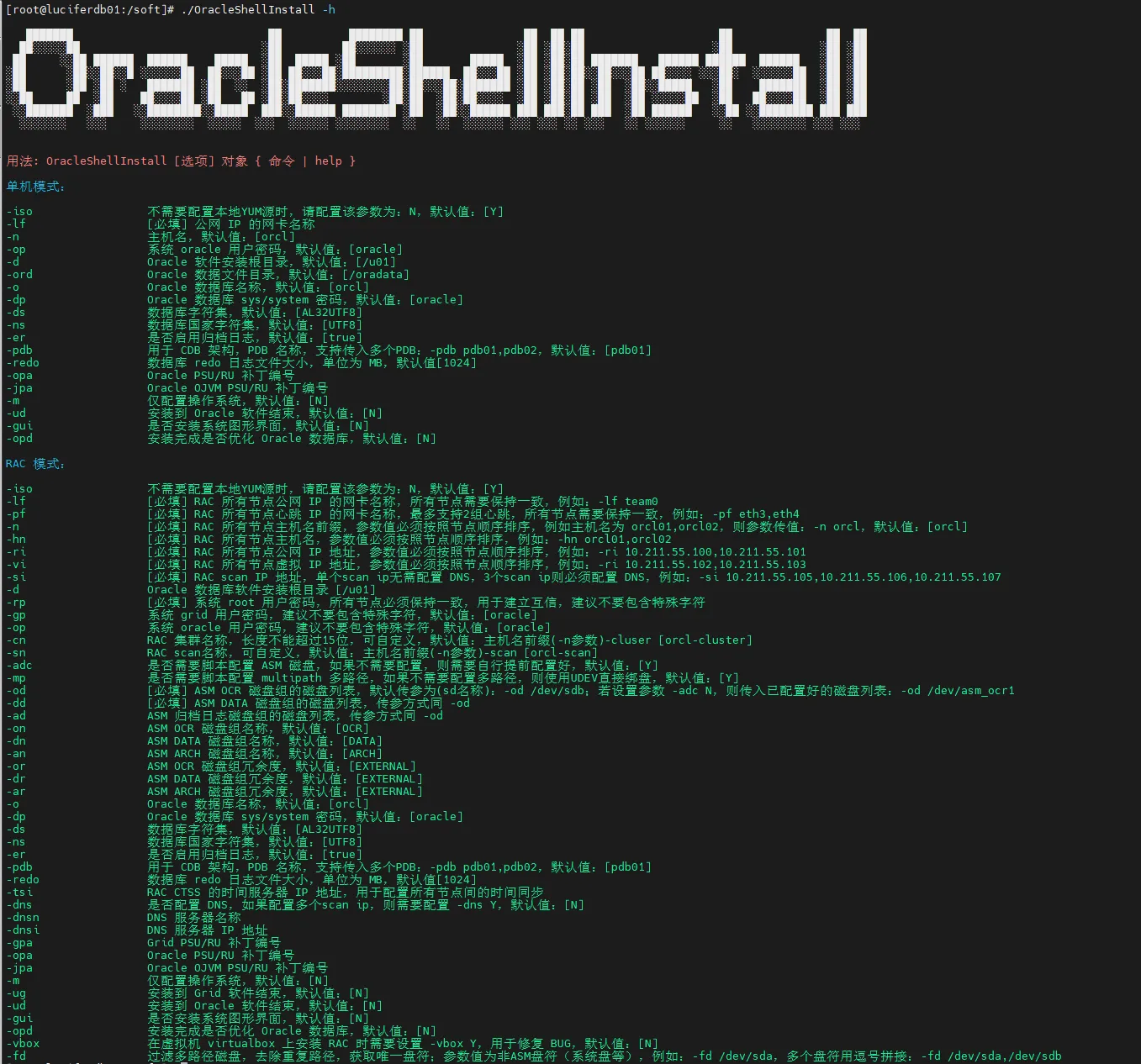
这里有一个 OracleShellInstall 脚本
安装命令 参考脚本对应的 README 文档,使用标准生产环境安装参数进行安装:
1 2 3 4 5 6 7 8 9 10 11 12 13 - n Debian12 `- op oracle `- d /u01 `- ord /oradata `- o lucifer `- dp oracle `- ds AL32UTF8 `- ns AL16UTF16 `- redo 100 `- opd Y `
安装过程 整个安装过程无需人工干预,选择对应的模式和版本之后就会执行全自动安装,安装过程如下:
1
2
3
4
5
6
7
8
9
10
11
12
13
14
15
16
17
18
19
20
21
22
23
24
25
26
27
28
29
30
31
32
33
34
35
36
37
38
39
40
41
42
43
44
45
46
47
48
49
50
51
███████ ██ ████████ ██ ██ ██ ██ ██ ██ ██ ██░░░░░██ ░██ ██░░░░░░ ░██ ░██ ░██░██ ░██ ░██ ░██ ██ ░░██ ██████ ██████ █████ ░██ █████ ░██ ░██ █████ ░██ ░██░██ ███████ ██████ ██████ ██████ ░██ ░██ ░██ ░██░░██░░█ ░░░░░░██ ██░░░██ ░██ ██░░░██░█████████░██████ ██░░░██ ░██ ░██░██░░██░░░██ ██░░░░ ░░░██░ ░░░░░░██ ░██ ░██ ░██ ░██ ░██ ░ ███████ ░██ ░░ ░██░███████░░░░░░░░██░██░░░██░███████ ░██ ░██░██ ░██ ░██░░█████ ░██ ███████ ░██ ░██ ░░██ ██ ░██ ██░░░░██ ░██ ██ ░██░██░░░░ ░██░██ ░██░██░░░░ ░██ ░██░██ ░██ ░██ ░░░░░██ ░██ ██░░░░██ ░██ ░██ ░░███████ ░███ ░░████████░░█████ ███░░██████ ████████ ░██ ░██░░██████ ███ ███░██ ███ ░██ ██████ ░░██ ░░████████ ███ ███ ░░░░░░░ ░░░ ░░░░░░░░ ░░░░░ ░░░ ░░░░░░ ░░░░░░░░ ░░ ░░ ░░░░░░ ░░░ ░░░ ░░ ░░░ ░░ ░░░░░░ ░░ ░░░░░░░░ ░░░ ░░░ 注意:本脚本仅用于新服务器上实施部署数据库使用,严禁在已运行数据库的主机上执行,以免发生数据丢失或者损坏,造成不可挽回的损失!!! 请选择安装模式 [单机(si)/单机ASM(sa)/集群(rac)] : si 数据库安装模式 : single 请选择数据库版本 [19] : 19 数据库版本 : 19 !!! 免责声明:当前操作系统版本是 [ Debian GNU/Linux 12 (bookworm) ] 不在 Oracle 官方支持列表,本脚本只负责安装,请确认是否继续安装 (Y/N) : [Y] OracleShellInstall 开始安装,详细安装过程可查看日志: tail -2000f /soft/print_shell_install_20250322103331.log 正在进行安装前检查,请稍等...... 正在检测安装包 /soft/LINUX.ARM64_1919000_db_home.zip 的 MD5 值是否正确,请稍等...... 正在配置网络软件源......已完成 (耗时 : 5 秒) 正在获取操作系统信息......已完成 (耗时 : 1 秒) 正在安装依赖包......已完成 (耗时 : 30 秒) 正在配置 Swap......已完成 (耗时 : 11 秒) 正在配置主机名和 hosts 文件......已完成 (耗时 : 0 秒) 正在创建用户和组......已完成 (耗时 : 1 秒) 正在创建安装目录......已完成 (耗时 : 0 秒) 正在配置 Avahi-daemon 服务......已完成 (耗时 : 1 秒) 正在配置透明大页 && NUMA && 磁盘 IO 调度器......已完成 (耗时 : 1 秒) 正在配置操作系统参数 sysctl......已完成 (耗时 : 1 秒) 正在配置 RemoveIPC......已完成 (耗时 : 1 秒) 正在配置用户限制 limit......已完成 (耗时 : 1 秒) 正在配置 shm 目录......已完成 (耗时 : 1 秒) 正在配置用户环境变量......已完成 (耗时 : 1 秒) 正在解压 Oracle 安装包以及补丁......已完成 (耗时 : 34 秒) 正在安装 Oracle 软件以及补丁......已完成 (耗时 : 41 秒) 正在创建监听......已完成 (耗时 : 1 秒) 正在创建数据库......已完成 (耗时 : 236 秒) 正在优化数据库......已完成 (耗时 : 5 秒) 恭喜!Oracle 一键安装执行完成 (耗时 : 378 秒),现在是否重启主机:[Y/N] Y
到这里,整个安装就完成了,非常丝滑!可以看到包括解压软件在内一共就花了 378 秒~
连接测试 安装完成后,我们进行一些简单的连接测试,确保数据库可以正常使用。
首先,查看 Oracle 版本以及补丁:
1 2 3 4 5 6 7 8 9 [oracle@Debian12 :/home/oracle ]$ sqlplus -vSQL *Plus: Release 19.0 .0.0 .0 - Production Version 19.19 .0.0 .0 @Debian12 :/home/oracle ]$ opatch lspatchesThere are no Interim patches installed in this Oracle Home "/u01/app/oracle/product/19.3.0/db" .OPatch succeeded.
查看监听是否正常:
1 2 3 4 5 6 7 8 9 10 11 12 13 14 15 16 17 18 19 20 21 22 23 24 25 26 27 [oracle@Debian12:/home/oracle]$ lsnrctl statfor Linux: Version 19.0 .0 .0 .0 - Production on 22 -MAR-2025 10 :42 :42 1991 , 2023 , Oracle. All rights reserved.1521 )))Alias LISTENERfor Linux: Version 19.0 .0 .0 .0 - Production22 -MAR-2025 10 :41 :51 0 days 0 hr. 0 min . 50 secParameter File /u01//oracle//19.3 .0 //network//listener.oraLog File //app//diag //Debian12//alert/
连接数据库:
1
2
3
4
5
6
7
8
9
10
11
12
13
14
15
16
17
18
19
20
21
22
23
24
25
26
27
28
[oracle@Debian12:/home/oracle]$ sasRelease 19.0 .0.0 .0 - Production on Sat Mar 22 10 :42 :54 2025 19.19 .0.0 .0 1982 , 2023 , Oracle. All rights reserved.to :19 c Enterprise Edition Release 19.0 .0.0 .0 - Production19.19 .0.0 .0 parameter nameTYPE VALUEstring string string string luciferstring luciferboolean FALSE string luciferstring string string string string lucifer
数据库连接正常。
写在最后 俗说得好:”懒人”推动世界的发展。 既然能用脚本解决的事情,为什么还要那么麻烦,干就完事儿了。