前言

PyGame 是一个专门设计来进行
游戏开发
设计的 Python 模块,允许实时电子游戏研发而无需被低级语言(如机器语言和汇编语言)束缚,使用起来非常的简单,非常适合新手拿来玩耍,本教程源码均基于 Python 3.x 版本。

点我跳转文末 ,关注公众号,回复 “五子棋” 获取完整源码!

五子棋小游戏

1、简介

五子棋是我们小时候经常玩的两人对弈策略小游戏,规则简单:

  • 1、对局双方各执一色棋子,常为黑白两色;
  • 2、空棋盘开局;
  • 3、黑先、白后,交替下子,每次只能下一子;
  • 4、棋子下在棋盘的空白点上,棋子下定后,不得向其它点移动,不得从棋盘上拿掉或拿起另落别处;
  • 5、黑方的第一枚棋子可下在棋盘任意交叉点上;
  • 6、轮流下子是双方的权利,但允许任何一方放弃下子权,先形成5子连线者获胜;

五子棋容易上手,规则简单,老少皆宜,而且趣味横生,引人入胜。它不仅能增强思维能力,提高智力,而且富含哲理,有助于修身养性。

2、环境准备

本次教程需要提前安装好 Python 3.x 环境以及 PyGame 模块,Python 环境建议安装 Anaconda 以及 Jupyter,对于新手比较友好!

1
2
3
4
5
6
7
pip install jupyter
pip install pygame

AI写代码python

* 1
* 2

安装好 PyGame 模块之后,咱们就可以正式开写了!

3、初始化环境

首先需要引入以下模块:

1
2
3
4
5
6
7
8
9
10
11
12
13
14
15
import sys
import random
import pygame
from pygame.locals import *
import pygame.gfxdraw
from collections import namedtuple

AI写代码python

* 1
* 2
* 3
* 4
* 5
* 6

接着我们初始化棋盘的一些变量,便于下面写代码:

1
2
3
4
5
6
7
8
9
10
11
12
13
14
15
16
17
18
19
20
21
22
23
24
25
26
27
28
29
30
31
32
33
34
35
36
37
38
39
40
41
42
43
44
45
46
47
48
49
50
51
52
53
54
55
56
57
Chessman = namedtuple('Chessman', 'Name Value Color')
Point = namedtuple('Point', 'X Y')

BLACK_CHESSMAN = Chessman('黑子', 1, (45, 45, 45))
WHITE_CHESSMAN = Chessman('白子', 2, (219, 219, 219))

offset = [(1, 0), (0, 1), (1, 1), (1, -1)]

SIZE = 30 # 棋盘每个点时间的间隔
Line_Points = 19 # 棋盘每行/每列点数
Outer_Width = 20 # 棋盘外宽度
Border_Width = 4 # 边框宽度
Inside_Width = 4 # 边框跟实际的棋盘之间的间隔
Border_Length = SIZE * (Line_Points - 1) + Inside_Width * 2 + Border_Width # 边框线的长度
Start_X = Start_Y = Outer_Width + int(Border_Width / 2) + Inside_Width # 网格线起点(左上角)坐标
SCREEN_HEIGHT = SIZE * (Line_Points - 1) + Outer_Width * 2 + Border_Width + Inside_Width * 2 # 游戏屏幕的高
SCREEN_WIDTH = SCREEN_HEIGHT + 200 # 游戏屏幕的宽

Stone_Radius = SIZE // 2 - 3 # 棋子半径
Stone_Radius2 = SIZE // 2 + 3
Checkerboard_Color = (0xE3, 0x92, 0x65) # 棋盘颜色
BLACK_COLOR = (0, 0, 0)
WHITE_COLOR = (255, 255, 255)
RED_COLOR = (200, 30, 30)
BLUE_COLOR = (30, 30, 200)

RIGHT_INFO_POS_X = SCREEN_HEIGHT + Stone_Radius2 * 2 + 10

AI写代码python

* 1
* 2
* 3
* 4
* 5
* 6
* 7
* 8
* 9
* 10
* 11
* 12
* 13
* 14
* 15
* 16
* 17
* 18
* 19
* 20
* 21
* 22
* 23
* 24
* 25
* 26
* 27

4、棋盘

通过上述变量画出棋盘,主要源码如下:

1
2
3
4
5
6
7
8
9
10
11
12
13
14
15
16
17
18
19
20
21
22
23
24
25
26
27
28
29
30
31
32
33
34
35
36
37
38
39
40
41
42
43
44
45
46
47
48
49
50
51
52
53
54
55
56
57
# 画棋盘
def _draw_checkerboard(screen):
# 填充棋盘背景色
screen.fill(Checkerboard_Color)
# 画棋盘网格线外的边框
pygame.draw.rect(screen, BLACK_COLOR, (Outer_Width, Outer_Width, Border_Length, Border_Length), Border_Width)
# 画网格线
for i in range(Line_Points):
pygame.draw.line(screen, BLACK_COLOR,
(Start_Y, Start_Y + SIZE * i),
(Start_Y + SIZE * (Line_Points - 1), Start_Y + SIZE * i),
1)
for j in range(Line_Points):
pygame.draw.line(screen, BLACK_COLOR,
(Start_X + SIZE * j, Start_X),
(Start_X + SIZE * j, Start_X + SIZE * (Line_Points - 1)),
1)
# 画星位和天元
for i in (3, 9, 15):
for j in (3, 9, 15):
if i == j == 9:
radius = 5
else:
radius = 3
# pygame.draw.circle(screen, BLACK, (Start_X + SIZE * i, Start_Y + SIZE * j), radius)
pygame.gfxdraw.aacircle(screen, Start_X + SIZE * i, Start_Y + SIZE * j, radius, BLACK_COLOR)
pygame.gfxdraw.filled_circle(screen, Start_X + SIZE * i, Start_Y + SIZE * j, radius, BLACK_COLOR)

AI写代码python

* 1
* 2
* 3
* 4
* 5
* 6
* 7
* 8
* 9
* 10
* 11
* 12
* 13
* 14
* 15
* 16
* 17
* 18
* 19
* 20
* 21
* 22
* 23
* 24
* 25
* 26
* 27

5、黑白棋子

有了棋盘当然少不了黑白棋子,比较简单:

1
2
3
4
5
6
7
8
9
10
11
12
13
# 画棋子
def _draw_chessman(screen, point, stone_color):
# pygame.draw.circle(screen, stone_color, (Start_X + SIZE * point.X, Start_Y + SIZE * point.Y), Stone_Radius)
pygame.gfxdraw.aacircle(screen, Start_X + SIZE * point.X, Start_Y + SIZE * point.Y, Stone_Radius, stone_color)
pygame.gfxdraw.filled_circle(screen, Start_X + SIZE * point.X, Start_Y + SIZE * point.Y, Stone_Radius, stone_color)

AI写代码python

* 1
* 2
* 3
* 4
* 5

6、对局信息

每一局游戏不可缺少的就是双方玩家的对局信息,主要展示双方的黑白执子以及战况,关键源码如下:

1
2
3
4
5
6
7
8
9
10
11
12
13
14
15
16
17
18
19
20
21
22
23
24
25
26
27
28
29
30
31
32
33
34
35
36
37
# 画左侧信息显示
def _draw_left_info(screen, font, cur_runner, black_win_count, white_win_count):
_draw_chessman_pos(screen, (SCREEN_HEIGHT + Stone_Radius2, Start_X + Stone_Radius2), BLACK_CHESSMAN.Color)
_draw_chessman_pos(screen, (SCREEN_HEIGHT + Stone_Radius2, Start_X + Stone_Radius2 * 4), WHITE_CHESSMAN.Color)

print_text(screen, font, RIGHT_INFO_POS_X, Start_X + 3, '玩家', BLUE_COLOR)
print_text(screen, font, RIGHT_INFO_POS_X, Start_X + Stone_Radius2 * 3 + 3, '电脑', BLUE_COLOR)

print_text(screen, font, SCREEN_HEIGHT, SCREEN_HEIGHT - Stone_Radius2 * 8, '战况:', BLUE_COLOR)
_draw_chessman_pos(screen, (SCREEN_HEIGHT + Stone_Radius2, SCREEN_HEIGHT - int(Stone_Radius2 * 4.5)), BLACK_CHESSMAN.Color)
_draw_chessman_pos(screen, (SCREEN_HEIGHT + Stone_Radius2, SCREEN_HEIGHT - Stone_Radius2 * 2), WHITE_CHESSMAN.Color)
print_text(screen, font, RIGHT_INFO_POS_X, SCREEN_HEIGHT - int(Stone_Radius2 * 5.5) + 3, f'{black_win_count} 胜', BLUE_COLOR)
print_text(screen, font, RIGHT_INFO_POS_X, SCREEN_HEIGHT - Stone_Radius2 * 3 + 3, f'{white_win_count} 胜', BLUE_COLOR)

def _draw_chessman_pos(screen, pos, stone_color):
pygame.gfxdraw.aacircle(screen, pos[0], pos[1], Stone_Radius2, stone_color)
pygame.gfxdraw.filled_circle(screen, pos[0], pos[1], Stone_Radius2, stone_color)

AI写代码python

* 1
* 2
* 3
* 4
* 5
* 6
* 7
* 8
* 9
* 10
* 11
* 12
* 13
* 14
* 15
* 16
* 17

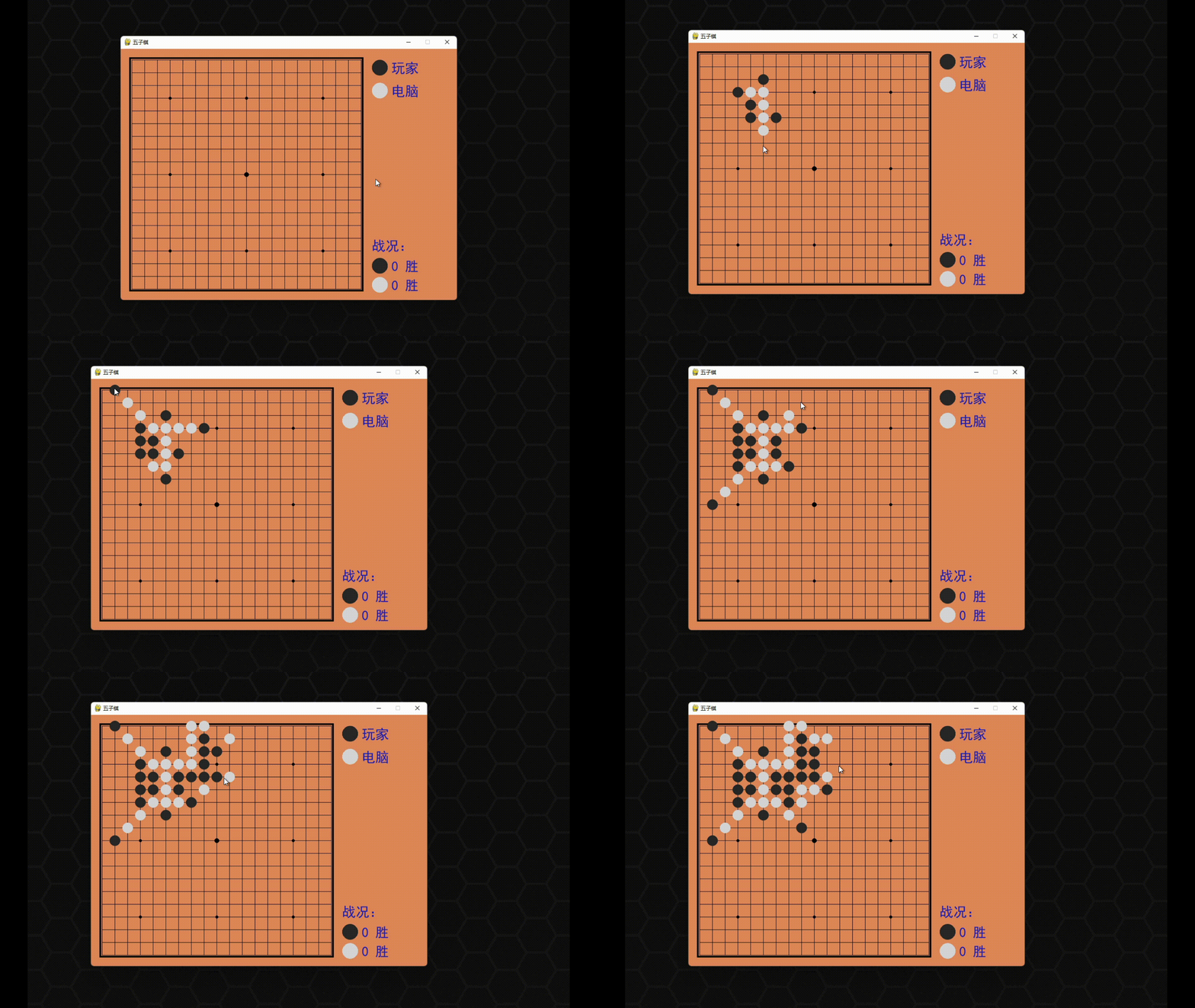
画出来的整体效果如下:

至此,整个棋盘的布局就完成了!

7、AI

由于咱们的小游戏不可以联机,因此大部分时间应该都是人机对下,这样就需要引入 AI 人机,让电脑作为对手陪我们下棋,主要源码如下:

1
2
3
4
5
6
7
8
9
10
11
12
13
14
15
16
17
18
19
20
21
22
23
24
25
26
27
28
29
30
31
32
33
34
35
36
37
38
39
40
41
42
43
44
45
46
47
48
49
50
51
52
53
54
55
56
57
58
59
60
61
62
63
64
65
66
67
68
69
70
71
72
73
74
75
76
77
78
79
80
81
82
83
84
85
86
87
88
89
90
91
92
93
94
95
96
97
98
99
100
101
102
103
104
105
106
107
108
109
110
111
112
113
114
115
116
117
118
119
120
121
122
123
124
125
126
127
128
129
130
131
132
133
134
135
136
137
138
139
140
141
142
143
144
145
146
147
148
149
150
151
152
153
154
155
156
157
158
159
160
161
162
163
164
165
166
167
168
169
170
171
172
173
174
175
176
177
178
179
180
181
182
183
184
185
186
187
188
189
190
191
192
193
194
195
196
197
198
199
200
201
202
203
204
205
206
207
208
209
210
211
212
213
214
215
216
217
218
219
220
221
222
223
224
225
226
227
228
229
230
231
232
233
234
235
236
237
238
239
240
241
242
243
244
245
246
247
248
249
250
251
252
253
254
255
256
257
258
259
260
261
262
263
264
265
266
267
268
269
270
271
272
273
274
275
276
277
278
279
280
281
282
283
284
285
286
287
288
289
290
291
292
293
294
295
296
297
298
299
300
301
302
303
304
305
306
307
308
309
310
311
312
313
314
315
316
317
318
319
320
321
322
323
324
325
326
327
328
329
330
331
332
333
334
335
336
337
338
339
340
341
342
343
344
345
346
347
348
349
350
351
352
353
354
355
356
357
358
359
360
361
362
363
364
365
366
367
368
369
370
371
372
373
374
375
class AI:
def __init__(self, line_points, chessman):
self._line_points = line_points
self._my = chessman
self._opponent = BLACK_CHESSMAN if chessman == WHITE_CHESSMAN else WHITE_CHESSMAN
self._checkerboard = [[0] * line_points for _ in range(line_points)]

def get_opponent_drop(self, point):
self._checkerboard[point.Y][point.X] = self._opponent.Value

def AI_drop(self):
point = None
score = 0
for i in range(self._line_points):
for j in range(self._line_points):
if self._checkerboard[j][i] == 0:
_score = self._get_point_score(Point(i, j))
if _score > score:
score = _score
point = Point(i, j)
elif _score == score and _score > 0:
r = random.randint(0, 100)
if r % 2 == 0:
point = Point(i, j)
self._checkerboard[point.Y][point.X] = self._my.Value
return point

def _get_point_score(self, point):
score = 0
for os in offset:
score += self._get_direction_score(point, os[0], os[1])
return score

def _get_direction_score(self, point, x_offset, y_offset):
count = 0 # 落子处我方连续子数
_count = 0 # 落子处对方连续子数
space = None # 我方连续子中有无空格
_space = None # 对方连续子中有无空格
both = 0 # 我方连续子两端有无阻挡
_both = 0 # 对方连续子两端有无阻挡

# 如果是 1 表示是边上是我方子,2 表示敌方子
flag = self._get_stone_color(point, x_offset, y_offset, True)
if flag != 0:
for step in range(1, 6):
x = point.X + step * x_offset
y = point.Y + step * y_offset
if 0 <= x < self._line_points and 0 <= y < self._line_points:
if flag == 1:
if self._checkerboard[y][x] == self._my.Value:
count += 1
if space is False:
space = True
elif self._checkerboard[y][x] == self._opponent.Value:
_both += 1
break
else:
if space is None:
space = False
else:
break # 遇到第二个空格退出
elif flag == 2:
if self._checkerboard[y][x] == self._my.Value:
_both += 1
break
elif self._checkerboard[y][x] == self._opponent.Value:
_count += 1
if _space is False:
_space = True
else:
if _space is None:
_space = False
else:
break
else:
# 遇到边也就是阻挡
if flag == 1:
both += 1
elif flag == 2:
_both += 1

if space is False:
space = None
if _space is False:
_space = None

_flag = self._get_stone_color(point, -x_offset, -y_offset, True)
if _flag != 0:
for step in range(1, 6):
x = point.X - step * x_offset
y = point.Y - step * y_offset
if 0 <= x < self._line_points and 0 <= y < self._line_points:
if _flag == 1:
if self._checkerboard[y][x] == self._my.Value:
count += 1
if space is False:
space = True
elif self._checkerboard[y][x] == self._opponent.Value:
_both += 1
break
else:
if space is None:
space = False
else:
break # 遇到第二个空格退出
elif _flag == 2:
if self._checkerboard[y][x] == self._my.Value:
_both += 1
break
elif self._checkerboard[y][x] == self._opponent.Value:
_count += 1
if _space is False:
_space = True
else:
if _space is None:
_space = False
else:
break
else:
# 遇到边也就是阻挡
if _flag == 1:
both += 1
elif _flag == 2:
_both += 1

score = 0
if count == 4:
score = 10000
elif _count == 4:
score = 9000
elif count == 3:
if both == 0:
score = 1000
elif both == 1:
score = 100
else:
score = 0
elif _count == 3:
if _both == 0:
score = 900
elif _both == 1:
score = 90
else:
score = 0
elif count == 2:
if both == 0:
score = 100
elif both == 1:
score = 10
else:
score = 0
elif _count == 2:
if _both == 0:
score = 90
elif _both == 1:
score = 9
else:
score = 0
elif count == 1:
score = 10
elif _count == 1:
score = 9
else:
score = 0

if space or _space:
score /= 2

return score

# 判断指定位置处在指定方向上是我方子、对方子、空
def _get_stone_color(self, point, x_offset, y_offset, next):
x = point.X + x_offset
y = point.Y + y_offset
if 0 <= x < self._line_points and 0 <= y < self._line_points:
if self._checkerboard[y][x] == self._my.Value:
return 1
elif self._checkerboard[y][x] == self._opponent.Value:
return 2
else:
if next:
return self._get_stone_color(Point(x, y), x_offset, y_offset, False)
else:
return 0
else:
return 0

AI写代码python

* 1
* 2
* 3
* 4
* 5
* 6
* 7
* 8
* 9
* 10
* 11
* 12
* 13
* 14
* 15
* 16
* 17
* 18
* 19
* 20
* 21
* 22
* 23
* 24
* 25
* 26
* 27
* 28
* 29
* 30
* 31
* 32
* 33
* 34
* 35
* 36
* 37
* 38
* 39
* 40
* 41
* 42
* 43
* 44
* 45
* 46
* 47
* 48
* 49
* 50
* 51
* 52
* 53
* 54
* 55
* 56
* 57
* 58
* 59
* 60
* 61
* 62
* 63
* 64
* 65
* 66
* 67
* 68
* 69
* 70
* 71
* 72
* 73
* 74
* 75
* 76
* 77
* 78
* 79
* 80
* 81
* 82
* 83
* 84
* 85
* 86
* 87
* 88
* 89
* 90
* 91
* 92
* 93
* 94
* 95
* 96
* 97
* 98
* 99
* 100
* 101
* 102
* 103
* 104
* 105
* 106
* 107
* 108
* 109
* 110
* 111
* 112
* 113
* 114
* 115
* 116
* 117
* 118
* 119
* 120
* 121
* 122
* 123
* 124
* 125
* 126
* 127
* 128
* 129
* 130
* 131
* 132
* 133
* 134
* 135
* 136
* 137
* 138
* 139
* 140
* 141
* 142
* 143
* 144
* 145
* 146
* 147
* 148
* 149
* 150
* 151
* 152
* 153
* 154
* 155
* 156
* 157
* 158
* 159
* 160
* 161
* 162
* 163
* 164
* 165
* 166
* 167
* 168
* 169
* 170
* 171
* 172
* 173
* 174
* 175
* 176
* 177
* 178
* 179
* 180
* 181
* 182
* 183
* 184
* 185
* 186

8、完善

最后就是对规则的一些完善,比如落子,判断输赢以及胜利界面之

的编写,关键源码如下:

1
2
3
4
5
6
7
8
9
10
11
12
13
14
15
16
17
18
19
20
21
22
23
24
25
26
27
28
29
30
31
32
33
34
35
36
37
38
39
40
41
42
43
44
45
46
47
48
49
50
51
52
53
54
55
56
57
58
59
60
61
62
63
64
65
66
67
68
69
70
71
72
73
74
75
76
77
78
79
80
81
82
83
84
85
86
87
88
89
90
91
92
93
94
95
96
97
98
99
100
101
102
103
104
105
106
107
108
109
class Checkerboard:
def __init__(self, line_points):
self._line_points = line_points
self._checkerboard = [[0] * line_points for _ in range(line_points)]

def _get_checkerboard(self):
return self._checkerboard

checkerboard = property(_get_checkerboard)

# 判断是否可落子
def can_drop(self, point):
return self._checkerboard[point.Y][point.X] == 0

def drop(self, chessman, point):
"""
落子
:param chessman:
:param point:落子位置
:return:若该子落下之后即可获胜,则返回获胜方,否则返回 None
"""
print(f'{chessman.Name} ({point.X}, {point.Y})')
self._checkerboard[point.Y][point.X] = chessman.Value

if self._win(point):
print(f'{chessman.Name}获胜')
return chessman

# 判断是否赢了
def _win(self, point):
cur_value = self._checkerboard[point.Y][point.X]
for os in offset:
if self._get_count_on_direction(point, cur_value, os[0], os[1]):
return True

def _get_count_on_direction(self, point, value, x_offset, y_offset):
count = 1
for step in range(1, 5):
x = point.X + step * x_offset
y = point.Y + step * y_offset
if 0 <= x < self._line_points and 0 <= y < self._line_points and self._checkerboard[y][x] == value:
count += 1
else:
break
for step in range(1, 5):
x = point.X - step * x_offset
y = point.Y - step * y_offset
if 0 <= x < self._line_points and 0 <= y < self._line_points and self._checkerboard[y][x] == value:
count += 1
else:
break

return count >= 5

AI写代码python

* 1
* 2
* 3
* 4
* 5
* 6
* 7
* 8
* 9
* 10
* 11
* 12
* 13
* 14
* 15
* 16
* 17
* 18
* 19
* 20
* 21
* 22
* 23
* 24
* 25
* 26
* 27
* 28
* 29
* 30
* 31
* 32
* 33
* 34
* 35
* 36
* 37
* 38
* 39
* 40
* 41
* 42
* 43
* 44
* 45
* 46
* 47
* 48
* 49
* 50
* 51
* 52
* 53

至此,整个游戏就已经制作完成,下面我们可以试玩一下:

PyGame每日一练——五子棋小游戏 - 图6

说来惭愧,竟不敌人机,再来一局,胜天半子,终于赢了!

感兴趣的小伙伴可以来玩一波啦!