Oracle Database Cloud Service - Version N/A and later Oracle Database - Enterprise Edition - Version 12.2.0.1 and later Oracle Database Cloud Schema Service - Version N/A and later Oracle Database Exadata Express Cloud Service - Version N/A and later Oracle Database Exadata Cloud Machine - Version N/A and later Information in this document applies to any platform.
GOAL
NOTE: In the images and/or the document content below, the user information and environment data used represents fictitious data from the Oracle sample schema(s), Public Documentation delivered with an Oracle database product or other training material. Any similarity to actual environments, actual persons, living or dead, is purely coincidental and not intended in any manner.
For the purposes of this document, the following fictitious environment is used as an example to describe the procedure:
This document provides details on usage of Parameter enabled_pdbs_on_standby and create pluggable databases (PDBs) STANDBYS option in an Oracle Multitenant environment that includes a Data Guard physical standby database.
SOLUTION
・create pluggable databases … STANDBYS option.
This parameter determines whether to physically create the datafile in the standby database. The new PDB is included in one or more standby CDBs. default value is “ALL”, include the new PDB in all standby CDBs. STANDBYS=NONE to exclude the new PDB from all standby CDBs.
・Parameter enabled_pdbs_on_standby.
This parameter determines whether to apply the redo log to the PDB of the standby database. Specifies which PDB to replicate on standby database. default value is “*”, replicate all PDBs. enabled_pdbs_on_standby is meaningful only on standby databases. It settings are ignored on a primary database.
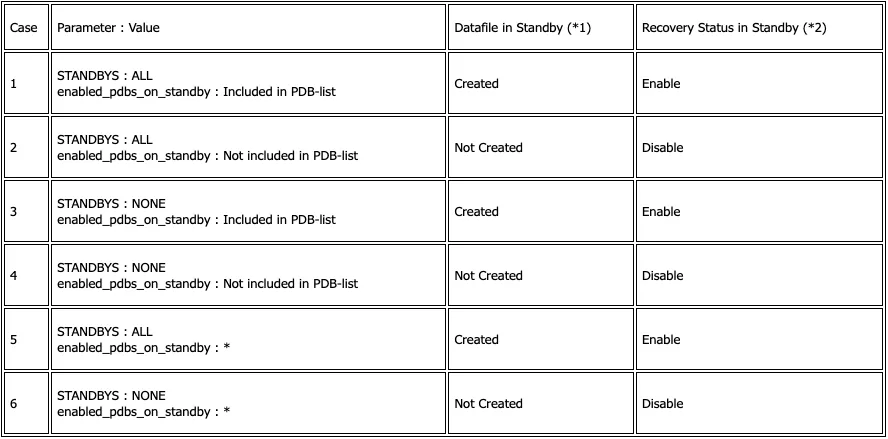
When creating a PDB in an Oracle Multitenant environment that includes a Data Guard physical standby database, create pluggable databases … STANDBYS option and Parameter enabled_pdbs_on_standby take precedence as follows.
(*1) : Whether the datafile is physically created in the standby database.
(*2) : Whether the redo log is applied the PDB on the standby database ( v$pdbs.recovery_status ).
Cases 1 to 4 are explained in the following procedure. (Case1 : PDB1, Case2 : PDB2, Case3 : PDB3, Case4 : PDB4).
1. On Standby Database, Parameter enabled_pdbs_on_standby includes PDB1 and PDB3 (not includes PDB2 and PDB4).
STANDBYS option and Parameter enabled_pdbs_on_standby is effective when creating a new PDB after Data Guard configuration. It does not affect the existing PDB before Data Guard configuration. Disabling PDB recovery after Data Guard configuration is as follows.
PDB Enabled/Disabled only applies to the initial creation of the PDB. At some point in the future PDB that had recovery enabled could have its recovery disabled and vice versa regardless of the settings of the parameter.
PDBs coming from external sources (plugins, remote clones) you still need to provide the files to the standby in some manner. These parameters/clauses have no impact in regard to populating the files at the standby for these cases.