无人值守安装Oracle 19C单机CDB+PDB,只需要30分钟?没错,通过脚本静默安装,真的只需要30分钟,包括安装补丁,建库。

脚本下载链接SHELL脚本进行oracle数据库一键安装,实现真正的无人值守安装

一、主机准备

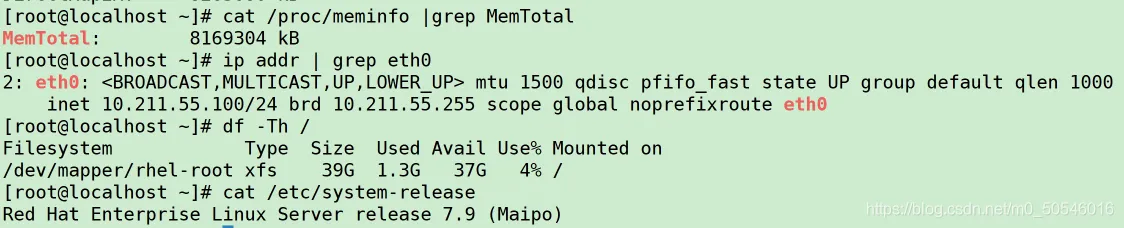
主机版本 主机内存 主机磁盘空间 主机网卡 主机IP
redhat 7.9 8G 50G eth0 10.211.55.100

注意:

1.主机内存不得低于8G

2.磁盘空间不得低于50G

30分钟!一键部署Oracle 19C单机CDB+PDB

二、安装前准备

1.挂载ISO镜像源

1
2
3
4
5
6
7
1. ##1.通过cdrom挂载
2. mount /dev/cdrom /mnt

4. ##2.通过安装镜像源挂载
5. mount -o loop /soft/rhel-server-7.9-x86_64-dvd.iso /mnt

AI写代码bash

30分钟!一键部署Oracle 19C单机CDB+PDB - 图2

2.创建目录并上传安装介质

1
2
3
4
5
6
7
8
9
10
11
12
13
14
15
16
17
18
19
20
21
22
23
1. ##1.创建安装介质上传目录
2. mkdir /soft
3. [root@localhost ~]# cd /soft/

5. ##2.上传安装介质
6. [root@localhost soft]# du -sh *
7. ##linux7系统缺少补丁包
8. 192K compat-libstdc++-33-3.2.3-72.el7.x86_64.rpm
9. ##oracle 19C DB官方安装包
10. 2.9G LINUX.X64_193000_db_home.zip
11. ##无人值守shell脚本
12. 140K OracleShellInstall.sh
13. ##oracle 19C PSU 最新版补丁包+6880880 OPatch补丁包
14. 1.3G p32545013_190000_Linux-x86-64.zip
15. 116M p6880880_190000_Linux-x86-64.zip
16. ##上下文切换软件(可选)
17. 276K rlwrap-0.42.tar.gz

19. ##3.授权脚本执行权限
20. chmod +x OracleShellInstall.sh

AI写代码bash

三、安装

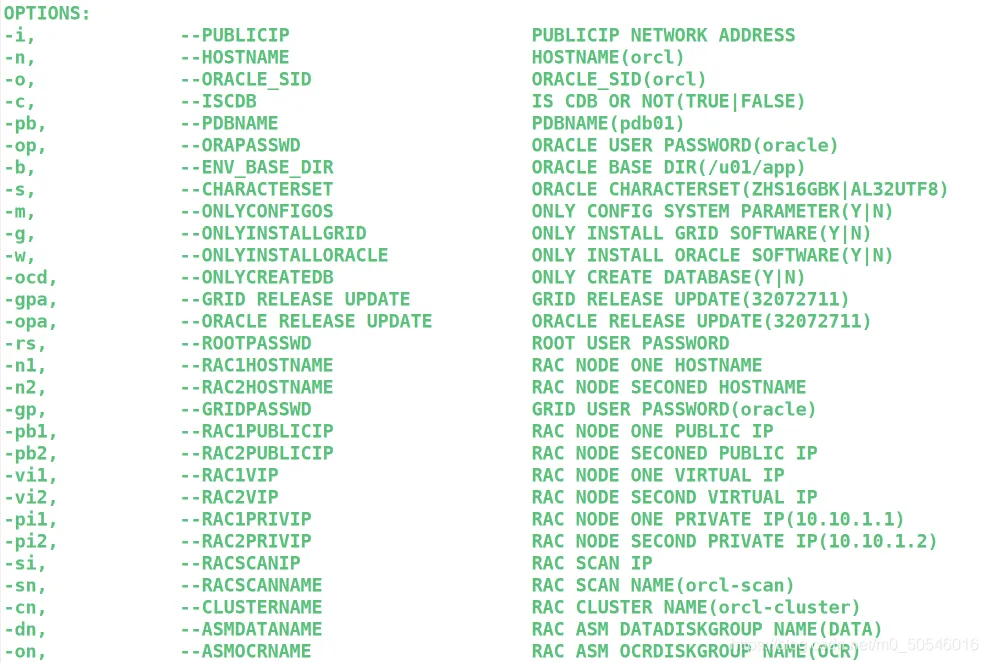
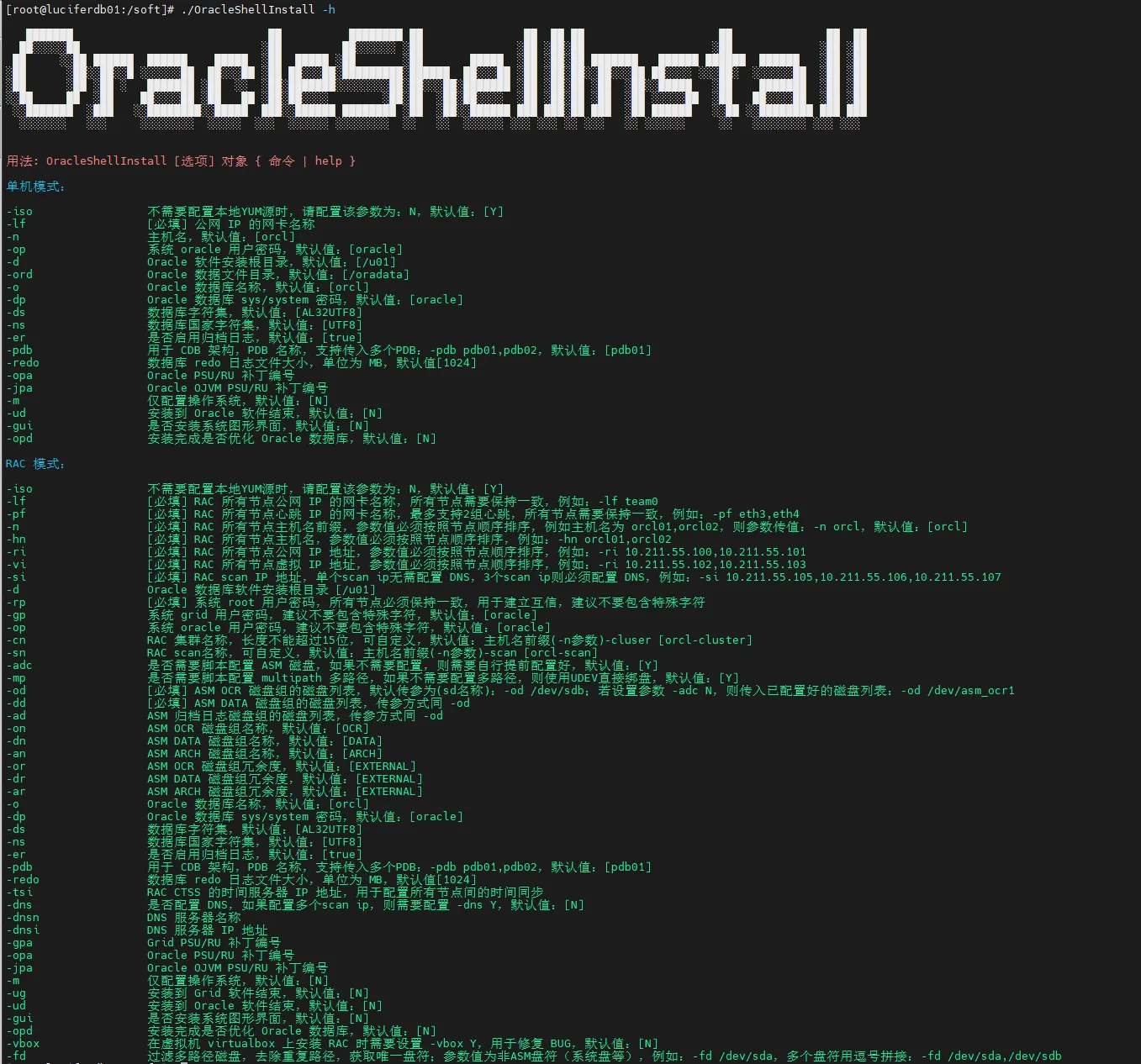
注意:可通过./OracleShellInstall.sh –help查看命令帮助

30分钟!一键部署Oracle 19C单机CDB+PDB - 图4

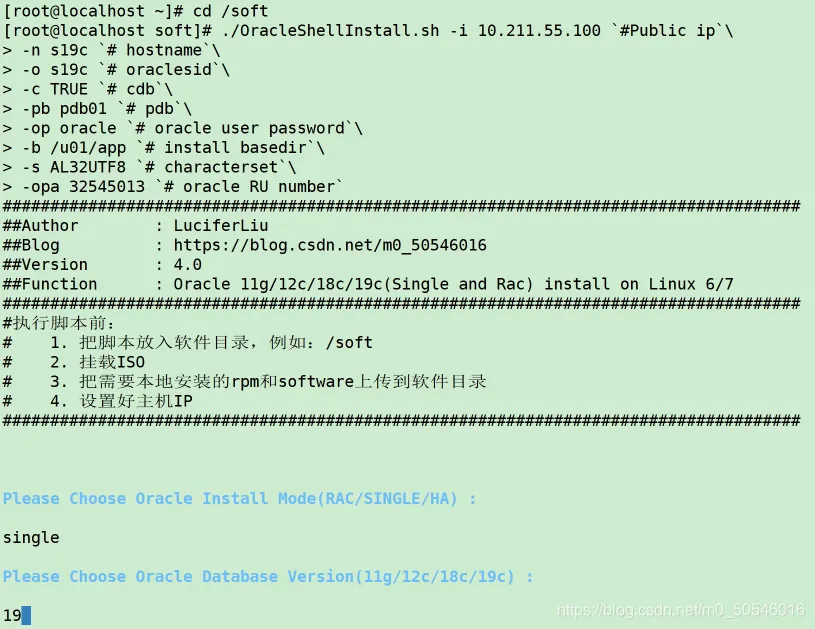
安装命令如下:

1
2
3
4
5
6
7
8
9
10
11
12
13
1. cd /soft
2. ./OracleShellInstall.sh -i 10.211.55.100 `#Public ip`\
3. -n s19c `# hostname`\
4. -o s19c `# oraclesid`\
5. -c TRUE `# cdb`\
6. -pb pdb01 `# pdb`\
7. -op oracle `# oracle user password`\
8. -b /u01/app `# install basedir`\
9. -s AL32UTF8 `# characterset`\
10. -opa 32545013 `# oracle RU number`

AI写代码bash

30分钟!一键部署Oracle 19C单机CDB+PDB - 图6

敲下回车将开始无人值守安装……

开始时间:12:55

执行过程太多…..略

安装日志记录在/soft目录下:oracleAllSilent_*.log,在文末展示安装日志。

30分钟!一键部署Oracle 19C单机CDB+PDB - 图7

安装结束后,将自动创建好一个上述指定实例名为s19c的数据库实例,并安装上传补丁32545013。

等待安装结束…….

结束时间:13:25

安装结束。

总耗时:

CDB+PDB数据库,30分钟。

30分钟!一键部署Oracle 19C单机CDB+PDB - 图8

30分钟!一键部署Oracle 19C单机CDB+PDB - 图9

安装日志如下:

1
2
3
4
5
6
7
8
9
10
11
12
13
14
15
16
17
18
19
20
21
22
23
24
25
26
27
28
29
30
31
32
33
34
35
36
37
38
39
40
41
42
43
44
45
46
47
48
49
50
51
52
53
54
55
56
57
58
59
60
61
62
63
64
65
66
67
68
69
70
71
72
73
74
75
76
77
78
79
80
81
82
83
84
85
86
87
88
89
90
91
92
93
94
95
96
97
98
99
100
101
102
103
104
105
106
107
108
109
110
111
112
113
114
115
116
117
118
119
120
121
122
123
124
125
126
127
128
129
130
131
132
133
134
135
136
137
138
139
140
141
142
143
144
145
146
147
148
149
150
151
152
153
154
155
156
157
158
159
160
161
162
163
164
165
166
167
168
169
170
171
172
173
174
175
176
177
178
179
180
181
182
183
184
185
186
187
188
189
190
191
192
193
194
195
196
197
198
199
200
201
202
203
204
205
206
207
208
209
210
211
212
213
214
215
216
217
218
219
220
221
222
223
224
225
226
227
228
229
230
231
232
233
234
235
236
237
238
239
240
241
242
243
244
245
246
247
248
249
250
251
252
253
254
255
256
257
258
259
260
261
262
263
264
265
266
267
268
269
270
271
272
273
274
275
276
277
278
279
280
281
282
283
284
285
286
287
288
289
290
291
292
293
294
295
296
297
298
299
300
301
302
303
304
305
306
307
308
309
310
311
312
313
314
315
316
317
318
319
320
321
322
323
324
325
326
327
328
329
330
331
332
333
334
335
336
337
338
339
340
341
342
343
344
345
346
347
348
349
350
351
352
353
354
355
356
357
358
359
360
361
362
363
364
365
366
367
368
369
370
371
372
373
374
375
376
377
378
379
380
381
382
383
384
385
386
387
388
389
390
391
392
393
394
395
396
397
398
399
400
401
402
403
404
405
406
407
408
409
410
411
412
413
414
415
416
417
418
419
420
421
422
423
424
425
426
427
428
429
430
431
432
433
434
435
436
437
438
439
440
441
442
443
444
445
446
447
448
449
450
451
452
453
454
455
456
457
458
459
460
461
462
463
464
465
466
467
468
469
470
471
472
473
474
475
476
477
478
479
480
481
482
483
484
485
486
487
488
489
490
491
492
493
494
495
496
497
498
499
500
501
502
503
504
505
506
507
508
509
510
511
512
513
514
515
516
517
518
519
520
521
522
523
524
525
526
527
528
529
530
531
532
533
534
535
536
537
538
539
540
541
542
543
544
545
546
547
548
549
550
551
552
553
554
555
556
557
558
559
560
561
562
563
564
565
566
567
568
569
570
571
572
573
574
575
576
577
578
579
580
581
582
583
584
585
586
587
588
589
590
591
592
593
594
595
596
597
598
599
600
601
602
603
604
605
606
607
608
609
610
611
612
613
614
615
616
617
618
619
620
621
622
623
624
625
626
627
628
629
630
631
632
633
634
635
636
637
638
639
640
641
642
643
644
645
646
647
648
649
650
651
652
653
654
655
656
657
658
659
660
661
662
663
664
665
666
667
668
669
670
671
672
673
674
675
676
677
1. [root@s19c soft]# cat oracleAllSilent_20210506025640.log
2. ####################################################################################

4. # Installation Logging

6. ####################################################################################

8. ####################################################################################

10. # OS Version

12. ####################################################################################

14. OS Version :

16. linux7

18. ####################################################################################

20. # DB Version

22. ####################################################################################

24. DB Version :

26. 19.3.0.0

28. ####################################################################################

30. # HOSTNAME

32. ####################################################################################

34. HOSTNAME :

36. s19c

38. ####################################################################################

40. # RPM Check

42. ####################################################################################

44. RPM Check :

46. bc-1.06.95-13.el7.x86_64
47. binutils-2.27-44.base.el7.x86_64
48. compat-libcap1-1.10-7.el7.x86_64
49. compat-libstdc++-33-3.2.3-72.el7.x86_64
50. gcc-4.8.5-44.el7.x86_64
51. gcc-c++-4.8.5-44.el7.x86_64
52. elfutils-libelf-0.176-5.el7.x86_64
53. elfutils-libelf-devel-0.176-5.el7.x86_64
54. glibc-2.17-317.el7.x86_64
55. glibc-devel-2.17-317.el7.x86_64
56. ksh-20120801-142.el7.x86_64
57. libaio-0.3.109-13.el7.x86_64
58. libaio-devel-0.3.109-13.el7.x86_64
59. libgcc-4.8.5-44.el7.x86_64
60. libstdc++-4.8.5-44.el7.x86_64
61. libstdc++-devel-4.8.5-44.el7.x86_64
62. libxcb-1.13-1.el7.x86_64
63. libX11-1.6.7-2.el7.x86_64
64. libXau-1.0.8-2.1.el7.x86_64
65. libXi-1.7.9-1.el7.x86_64
66. libXtst-1.2.3-1.el7.x86_64
67. libXrender-0.9.10-1.el7.x86_64
68. libXrender-devel-0.9.10-1.el7.x86_64
69. make-3.82-24.el7.x86_64
70. net-tools-2.0-0.25.20131004git.el7.x86_64
71. nfs-utils-1.3.0-0.68.el7.x86_64
72. smartmontools-7.0-2.el7.x86_64
73. sysstat-10.1.5-19.el7.x86_64
74. e2fsprogs-1.42.9-19.el7.x86_64
75. e2fsprogs-libs-1.42.9-19.el7.x86_64
76. fontconfig-devel-2.13.0-4.3.el7.x86_64
77. expect-5.45-14.el7_1.x86_64
78. unzip-6.0-21.el7.x86_64
79. openssh-clients-7.4p1-21.el7.x86_64
80. readline-6.2-11.el7.x86_64

82. ####################################################################################

84. # /etc/hosts

86. ####################################################################################

88. /etc/hosts :

90. 127.0.0.1 localhost localhost.localdomain localhost4 localhost4.localdomain4
91. ::1 localhost localhost.localdomain localhost6 localhost6.localdomain6

93. #Public IP
94. 10.211.55.100 s19c

96. ####################################################################################

98. # Create user and groups(oracle)

100. ####################################################################################

102. Create user and groups(oracle) :

104. uid=54321(oracle) gid=54321(oinstall) groups=54321(oinstall),54322(dba),54323(oper),54324(backupdba),54325(dgdba),54326(kmdba),54330(racdba)

106. ####################################################################################

108. # chronyd

110. ####################################################################################

112. chronyd :

114. ● chronyd.service - NTP client/server
115. Loaded: loaded (/usr/lib/systemd/system/chronyd.service; disabled; vendor preset: enabled)
116. Active: inactive (dead)
117. Docs: man:chronyd(8)
118. man:chrony.conf(5)

120. May 06 14:23:54 localhost.localdomain systemd[1]: Starting NTP client/server...
121. May 06 14:23:54 localhost.localdomain chronyd[731]: chronyd version 3.4 starting (+CMDMON +NTP +REFCLOCK +RTC +PRIVDROP +SCFILTER +SIGND +ASYNCDNS +SECHASH +IPV6 +DEBUG)
122. May 06 14:23:54 localhost.localdomain systemd[1]: Started NTP client/server.
123. May 06 14:57:40 s19c chronyd[731]: chronyd exiting
124. May 06 14:57:40 s19c systemd[1]: Stopping NTP client/server...
125. May 06 14:57:40 s19c systemd[1]: Stopped NTP client/server.

127. ####################################################################################

129. # Time dependent

131. ####################################################################################

133. Time dependent :

135. Thu May 6 14:57:41 CST 2021

137. ####################################################################################

139. # avahi-daemon

141. ####################################################################################

143. avahi-daemon :

145. ● avahi-daemon.service - Avahi mDNS/DNS-SD Stack
146. Loaded: loaded (/usr/lib/systemd/system/avahi-daemon.service; enabled; vendor preset: enabled)
147. Active: inactive (dead)

149. ####################################################################################

151. # Firewalld

153. ####################################################################################

155. Firewalld :

157. ● firewalld.service - firewalld - dynamic firewall daemon
158. Loaded: loaded (/usr/lib/systemd/system/firewalld.service; disabled; vendor preset: enabled)
159. Active: inactive (dead)
160. Docs: man:firewalld(1)

162. May 06 14:23:54 localhost.localdomain systemd[1]: Starting firewalld - dynamic firewall daemon...
163. May 06 14:23:55 localhost.localdomain systemd[1]: Started firewalld - dynamic firewall daemon.
164. May 06 14:23:55 localhost.localdomain firewalld[750]: WARNING: AllowZoneDrifting is enabled. This is considered an insecure configuration option. It will be removed in a future release. Please consider disabling it now.
165. May 06 14:57:41 s19c systemd[1]: Stopping firewalld - dynamic firewall daemon...
166. May 06 14:57:41 s19c systemd[1]: Stopped firewalld - dynamic firewall daemon.

168. ####################################################################################

170. # SELINUX

172. ####################################################################################

174. SELINUX :

176. Permissive

178. ####################################################################################

180. # /etc/default/grub

182. ####################################################################################

184. /etc/default/grub :

186. GRUB_TIMEOUT=5
187. GRUB_DISTRIBUTOR="$(sed 's, release .*$,,g' /etc/system-release)"
188. GRUB_DEFAULT=saved
189. GRUB_DISABLE_SUBMENU=true
190. GRUB_TERMINAL_OUTPUT="console"
191. GRUB_CMDLINE_LINUX="spectre_v2=retpoline rd.lvm.lv=rhel/root rd.lvm.lv=rhel/swap rhgb quiet transparent_hugepage=never numa=off"
192. GRUB_DISABLE_RECOVERY="true"

194. ####################################################################################

196. # Transparent_hugepages

198. ####################################################################################

200. Transparent_hugepages :

202. [always] madvise never

204. ####################################################################################

206. # NUMA

208. ####################################################################################

210. NUMA :

212. BOOT_IMAGE=/vmlinuz-3.10.0-1160.el7.x86_64 root=/dev/mapper/rhel-root ro spectre_v2=retpoline rd.lvm.lv=rhel/root rd.lvm.lv=rhel/swap rhgb quiet LANG=en_US.UTF-8

214. ####################################################################################

216. # NetworkManager

218. ####################################################################################

220. NetworkManager :

222. ● NetworkManager.service - Network Manager
223. Loaded: loaded (/usr/lib/systemd/system/NetworkManager.service; disabled; vendor preset: enabled)
224. Active: inactive (dead) since Thu 2021-05-06 14:57:43 CST; 157ms ago
225. Docs: man:NetworkManager(8)
226. Main PID: 771 (code=exited, status=0/SUCCESS)

228. May 06 14:43:52 localhost.localdomain NetworkManager[771]: <info> [1620283432.5703] device (eth1): state change: secondaries -> activated (reason 'none', sys-iface-state: 'managed')
229. May 06 14:43:52 localhost.localdomain NetworkManager[771]: <info> [1620283432.5722] device (eth1): Activation: successful, device activated.
230. May 06 14:54:41 localhost.localdomain NetworkManager[771]: <info> [1620284081.7516] manager: kernel firmware directory '/lib/firmware' changed
231. May 06 14:57:35 s19c NetworkManager[771]: <info> [1620284255.3818] hostname: hostname changed from "localhost.localdomain" to "s19c"
232. May 06 14:57:35 s19c NetworkManager[771]: <info> [1620284255.3822] policy: set-hostname: set hostname to 's19c' (from system configuration)
233. May 06 14:57:43 s19c NetworkManager[771]: <info> [1620284263.8028] caught SIGTERM, shutting down normally.
234. May 06 14:57:43 s19c systemd[1]: Stopping Network Manager...
235. May 06 14:57:43 s19c NetworkManager[771]: <info> [1620284263.8054] manager: NetworkManager state is now CONNECTED_SITE
236. May 06 14:57:43 s19c NetworkManager[771]: <info> [1620284263.8064] exiting (success)
237. May 06 14:57:43 s19c systemd[1]: Stopped Network Manager.

239. ####################################################################################

241. # rlwrap

243. ####################################################################################

245. rlwrap :

247. rlwrap 0.42

249. ####################################################################################

251. # /etc/sysctl.conf

253. ####################################################################################

255. /etc/sysctl.conf :

257. fs.aio-max-nr = 1048576
258. fs.file-max = 6815744
259. kernel.shmall = 2097152
260. kernel.shmmax = 8365367295
261. kernel.shmmni = 4096
262. kernel.sem = 250 32000 100 128
263. net.ipv4.ip_local_port_range = 9000 65500
264. net.core.rmem_default = 262144
265. net.core.rmem_max = 4194304
266. net.core.wmem_default = 262144
267. net.core.wmem_max = 1048576

269. ####################################################################################

271. # NOZEROCONF

273. ####################################################################################

275. NOZEROCONF :

277. # Created by anaconda
278. #OracleBegin
279. NOZEROCONF=yes
280. #OracleEnd

282. ####################################################################################

284. # /etc/security/limits.d/20-nproc.conf

286. ####################################################################################

288. /etc/security/limits.d/20-nproc.conf :

290. # Default limit for number of user's processes to prevent
291. # accidental fork bombs.
292. # See rhbz #432903 for reasoning.

294. * - nproc 16384
295. root soft nproc unlimited

297. ####################################################################################

299. # /etc/security/limits.conf

301. ####################################################################################

303. /etc/security/limits.conf :

305. # /etc/security/limits.conf
306. #
307. #This file sets the resource limits for the users logged in via PAM.
308. #It does not affect resource limits of the system services.
309. #
310. #Also note that configuration files in /etc/security/limits.d directory,
311. #which are read in alphabetical order, override the settings in this
312. #file in case the domain is the same or more specific.
313. #That means for example that setting a limit for wildcard domain here
314. #can be overriden with a wildcard setting in a config file in the
315. #subdirectory, but a user specific setting here can be overriden only
316. #with a user specific setting in the subdirectory.
317. #
318. #Each line describes a limit for a user in the form:
319. #
320. #<domain> <type> <item> <value>
321. #
322. #Where:
323. #<domain> can be:
324. # - a user name
325. # - a group name, with @group syntax
326. # - the wildcard *, for default entry
327. # - the wildcard %, can be also used with %group syntax,
328. # for maxlogin limit
329. #
330. #<type> can have the two values:
331. # - "soft" for enforcing the soft limits
332. # - "hard" for enforcing hard limits
333. #
334. #<item> can be one of the following:
335. # - core - limits the core file size (KB)
336. # - data - max data size (KB)
337. # - fsize - maximum filesize (KB)
338. # - memlock - max locked-in-memory address space (KB)
339. # - nofile - max number of open file descriptors
340. # - rss - max resident set size (KB)
341. # - stack - max stack size (KB)
342. # - cpu - max CPU time (MIN)
343. # - nproc - max number of processes
344. # - as - address space limit (KB)
345. # - maxlogins - max number of logins for this user
346. # - maxsyslogins - max number of logins on the system
347. # - priority - the priority to run user process with
348. # - locks - max number of file locks the user can hold
349. # - sigpending - max number of pending signals
350. # - msgqueue - max memory used by POSIX message queues (bytes)
351. # - nice - max nice priority allowed to raise to values: [-20, 19]
352. # - rtprio - max realtime priority
353. #
354. #<domain> <type> <item> <value>
355. #

357. #* soft core 0
358. #* hard rss 10000
359. #@student hard nproc 20
360. #@faculty soft nproc 20
361. #@faculty hard nproc 50
362. #ftp hard nproc 0
363. #@student - maxlogins 4

365. # End of file
366. #OracleBegin
367. oracle soft nofile 1024
368. oracle hard nofile 65536
369. oracle soft stack 10240
370. oracle hard stack 32768
371. oracle soft nproc 2047
372. oracle hard nproc 16384
373. oracle hard memlock 134217728
374. oracle soft memlock 134217728
375. #OracleEnd

377. ####################################################################################

379. # /etc/pam.d/login

381. ####################################################################################

383. /etc/pam.d/login :

385. #%PAM-1.0
386. auth [user_unknown=ignore success=ok ignore=ignore default=bad] pam_securetty.so
387. auth substack system-auth
388. auth include postlogin
389. account required pam_nologin.so
390. account include system-auth
391. password include system-auth
392. # pam_selinux.so close should be the first session rule
393. session required pam_selinux.so close
394. session required pam_loginuid.so
395. session optional pam_console.so
396. # pam_selinux.so open should only be followed by sessions to be executed in the user context
397. session required pam_selinux.so open
398. session required pam_namespace.so
399. session optional pam_keyinit.so force revoke
400. session include system-auth
401. session include postlogin
402. -session optional pam_ck_connector.so
403. #OracleBegin
404. session required pam_limits.so
405. session required /lib64/security/pam_limits.so
406. #OracleEnd

408. ####################################################################################

410. # /dev/shm

412. ####################################################################################

414. /dev/shm :

417. #
418. # /etc/fstab
419. # Created by anaconda on Thu May 6 02:11:47 2021
420. #
421. # Accessible filesystems, by reference, are maintained under '/dev/disk'
422. # See man pages fstab(5), findfs(8), mount(8) and/or blkid(8) for more info
423. #
424. /dev/mapper/rhel-root / xfs defaults 0 0
425. UUID=32cd2453-e3e4-4e58-a3c5-d7eb092d7469 /boot xfs defaults 0 0
426. /dev/mapper/rhel-home /home xfs defaults 0 0
427. /dev/mapper/rhel-swap swap swap defaults 0 0
428. /swapfile swap swap defaults 0 0
429. tmpfs /dev/shm tmpfs size=8169304k 0 0

431. ####################################################################################

433. # df -hP

435. ####################################################################################

437. df -hP :

439. Filesystem Size Used Avail Use% Mounted on
440. devtmpfs 3.9G 0 3.9G 0% /dev
441. tmpfs 7.8G 0 7.8G 0% /dev/shm
442. tmpfs 3.9G 9.1M 3.9G 1% /run
443. tmpfs 3.9G 0 3.9G 0% /sys/fs/cgroup
444. /dev/mapper/rhel-root 39G 11G 28G 28% /
445. /dev/sda1 1014M 153M 862M 16% /boot
446. /dev/mapper/rhel-home 19G 33M 19G 1% /home
447. tmpfs 798M 0 798M 0% /run/user/0
448. /dev/sr0 4.3G 4.3G 0 100% /mnt

450. ####################################################################################

452. # Oracle Profile

454. ####################################################################################

456. Oracle Profile :

458. # .bash_profile

460. # Get the aliases and functions
461. if [ -f ~/.bashrc ]; then
462. . ~/.bashrc
463. fi

465. # User specific environment and startup programs

467. PATH=$PATH:$HOME/.local/bin:$HOME/bin

469. export PATH
470. ################OracleBegin#########################
471. umask 022
472. export TMP=/tmp
473. export TMPDIR=$TMP
474. export NLS_LANG=AMERICAN_AMERICA.AL32UTF8 #AL32UTF8,ZHS16GBK
475. export ORACLE_BASE=/u01/app/oracle
476. export ORACLE_HOME=/u01/app/oracle/product/19.3.0/db
477. export ORACLE_HOSTNAME=s19c
478. export ORACLE_TERM=xterm
479. export TNS_ADMIN=$ORACLE_HOME/network/admin
480. export LD_LIBRARY_PATH=$ORACLE_HOME/lib:/lib:/usr/lib
481. export ORACLE_SID=s19c
482. export PATH=/usr/sbin:$PATH
483. export PATH=$ORACLE_HOME/bin:$ORACLE_HOME/OPatch:$PATH
484. alias sas='sqlplus / as sysdba'
485. alias alert='tail -500f $ORACLE_BASE/diag/rdbms/$ORACLE_SID/$ORACLE_SID/trace/alert_$ORACLE_SID.log|more'
486. export PS1="[`whoami`@`hostname`:"'$PWD]$ '
487. alias sqlplus='rlwrap sqlplus'
488. alias rman='rlwrap rman'
489. alias lsnrctl='rlwrap lsnrctl'
490. alias asmcmd='rlwrap asmcmd'
491. alias adrci='rlwrap adrci'
492. alias ggsci='rlwrap ggsci'
493. alias dgmgrl='rlwrap dgmgrl'
494. ################OracleEnd###########################

496. ####################################################################################

498. # /soft/db.rsp

500. ####################################################################################

502. /soft/db.rsp :

504. oracle.install.responseFileVersion=/oracle/install/rspfmt_dbinstall_response_schema_v19.0.0
505. oracle.install.option=INSTALL_DB_SWONLY
506. UNIX_GROUP_NAME=oinstall
507. INVENTORY_LOCATION=/u01/app/oraInventory
508. ORACLE_BASE=/u01/app/oracle
509. oracle.install.db.InstallEdition=EE
510. oracle.install.db.OSDBA_GROUP=dba
511. oracle.install.db.OSOPER_GROUP=oper
512. oracle.install.db.OSBACKUPDBA_GROUP=backupdba
513. oracle.install.db.OSDGDBA_GROUP=dgdba
514. oracle.install.db.OSKMDBA_GROUP=kmdba
515. oracle.install.db.OSRACDBA_GROUP=racdba
516. oracle.install.db.rootconfig.executeRootScript=false
517. oracle.install.db.rootconfig.configMethod=

519. ####################################################################################

521. # /soft/netca.rsp

523. ####################################################################################

525. /soft/netca.rsp :

527. [GENERAL]
528. RESPONSEFILE_VERSION="19.3"
529. CREATE_TYPE="CUSTOM"
530. [oracle.net.ca]
531. INSTALLED_COMPONENTS={"server","net8","javavm"}
532. INSTALL_TYPE=""typical""
533. LISTENER_NUMBER=1
534. LISTENER_NAMES={"LISTENER"}
535. LISTENER_PROTOCOLS={"TCP;1521"}
536. LISTENER_START=""LISTENER""
537. NAMING_METHODS={"TNSNAMES","ONAMES","HOSTNAME"}
538. NSN_NUMBER=1
539. NSN_NAMES={"EXTPROC_CONNECTION_DATA"}
540. NSN_SERVICE={"PLSExtProc"}
541. NSN_PROTOCOLS={"TCP;HOSTNAME;1521"}

543. ####################################################################################

545. # /soft/netca.rsp

547. ####################################################################################

549. /soft/netca.rsp :

551. [GENERAL]
552. RESPONSEFILE_VERSION="19.3"
553. CREATE_TYPE="CUSTOM"
554. [oracle.net.ca]
555. INSTALLED_COMPONENTS={"server","net8","javavm"}
556. INSTALL_TYPE=""typical""
557. LISTENER_NUMBER=1
558. LISTENER_NAMES={"LISTENER"}
559. LISTENER_PROTOCOLS={"TCP;1521"}
560. LISTENER_START=""LISTENER""
561. NAMING_METHODS={"TNSNAMES","ONAMES","HOSTNAME"}
562. NSN_NUMBER=1
563. NSN_NAMES={"EXTPROC_CONNECTION_DATA"}
564. NSN_SERVICE={"PLSExtProc"}
565. NSN_PROTOCOLS={"TCP;HOSTNAME;1521"}

567. ####################################################################################

569. # Oracle RDBMS

571. ####################################################################################

573. Oracle RDBMS :

576. SQL*Plus: Release 19.0.0.0.0 - Production
577. Version 19.11.0.0.0

580. ####################################################################################

582. # Oracle OPatch Version

584. ####################################################################################

586. Oracle OPatch Version :

588. OPatch Version: 12.2.0.1.24

590. OPatch succeeded.

592. ####################################################################################

594. # OPatch lspatches

596. ####################################################################################

598. OPatch lspatches :

600. 32545013;Database Release Update : 19.11.0.0.210420 (32545013)
601. 29585399;OCW RELEASE UPDATE 19.3.0.0.0 (29585399)

603. OPatch succeeded.

605. ####################################################################################

607. # ORACLE Instance

609. ####################################################################################

611. ORACLE Instance :

614. LSNRCTL for Linux: Version 19.0.0.0.0 - Production on 06-MAY-2021 15:25:40

616. Copyright (c) 1991, 2021, Oracle. All rights reserved.

618. Connecting to (DESCRIPTION=(ADDRESS=(PROTOCOL=TCP)(HOST=s19c)(PORT=1521)))
619. STATUS of the LISTENER
620. ------------------------
621. Alias LISTENER
622. Version TNSLSNR for Linux: Version 19.0.0.0.0 - Production
623. Start Date 06-MAY-2021 15:05:45
624. Uptime 0 days 0 hr. 19 min. 54 sec
625. Trace Level off
626. Security ON: Local OS Authentication
627. SNMP OFF
628. Listener Parameter File /u01/app/oracle/product/19.3.0/db/network/admin/listener.ora
629. Listener Log File /u01/app/oracle/diag/tnslsnr/s19c/listener/alert/log.xml
630. Listening Endpoints Summary...
631. (DESCRIPTION=(ADDRESS=(PROTOCOL=tcp)(HOST=s19c)(PORT=1521)))
632. (DESCRIPTION=(ADDRESS=(PROTOCOL=ipc)(KEY=EXTPROC1521)))
633. Services Summary...
634. Service "86b637b62fdf7a65e053f706e80a27ca" has 1 instance(s).
635. Instance "s19c", status READY, has 1 handler(s) for this service...
636. Service "s19c" has 1 instance(s).
637. Instance "s19c", status READY, has 1 handler(s) for this service...
638. Service "s19cXDB" has 1 instance(s).
639. Instance "s19c", status READY, has 1 handler(s) for this service...
640. The command completed successfully

642. ####################################################################################

644. # Oracle Implied parameters

646. ####################################################################################

648. Oracle Implied parameters :

651. SQL*Plus: Release 19.0.0.0.0 - Production on Thu May 6 15:25:53 2021
652. Version 19.11.0.0.0

654. Copyright (c) 1982, 2020, Oracle. All rights reserved.

657. Connected to:
658. Oracle Database 19c Enterprise Edition Release 19.0.0.0.0 - Production
659. Version 19.11.0.0.0

662. NAME TYPE VALUE
663. ------------------------------------ ----------- ------------------------------
664. audit_trail string DB

666. NAME TYPE VALUE
667. ------------------------------------ ----------- ------------------------------
668. deferred_segment_creation boolean FALSE

670. NAME TYPE VALUE
671. ------------------------------------ ----------- ------------------------------
672. result_cache_max_size big integer 0

674. NAME VALUE DESCRIB
675. ---------------------------------------- ---------- ------------------------------------------------------------
676. _use_single_log_writer ADAPTIVE Use a single process for redo log writing
677. _use_adaptive_log_file_sync TRUE Adaptively switch between post/wait and polling
678. _optimizer_cartesian_enabled FALSE optimizer cartesian join enabled

680. Disconnected from Oracle Database 19c Enterprise Edition Release 19.0.0.0.0 - Production
681. Version 19.11.0.0.0

AI写代码bash