[root@vastbase ~]# grub2-mkconfig -o /boot/grub2/grub.cfg Generating grub configuration file ... Found linux image: /boot/vmlinuz-5.10.0-182.0.0.95.oe2203sp3.x86_64 Found initrd image: /boot/initramfs-5.10.0-182.0.0.95.oe2203sp3.x86_64.img Found linux image: /boot/vmlinuz-0-rescue-39cd0fedff3b4d4ea197a52f0c9a6794 Found initrd image: /boot/initramfs-0-rescue-39cd0fedff3b4d4ea197a52f0c9a6794.img Adding boot menu entry for UEFI Firmware Settings ... done
------------------ Preparing the installation environment...
Finish to prepare the installation environment =============================================================================== IPC parameter check ---------------
The IPC parameter check is complete =============================================================================== Install database ---------------
Whether to instantiate the database (Y/N): Y
Select installation type
Typical installation : Use default parameters to init database Custom installation : Configure installation parameters and functions manually
-> 1- Typical installation 2- Custom installation
Select the installation type, or type <Enter> to select the default (1): 2 =============================================================================== Database Initialization User Password (Press the backspace key to go back) ---------------
Enter the password of database initialization user (vastbase): ***********
-> 1- Use the database initialization password (default) 2- Enter the encryption key manually
Select the database encryption key setting, or type <Enter> to select the default(1): =============================================================================== Vastbase installation directory ---------------
Select the database initialization directory Default location: /home/vastbase/data/vastbase
Type the absolute path (ctrl+ backspace to backspace), or type <Enter> to use the default path : /vastdata/data/vastbase =============================================================================== listener port ---------------
Enter the listening port, or type <Enter> to select the default (5432):
=============================================================================== Max Connections ---------------
Enter the maximum number of client connections, or type <Enter> to select the default (500): 1500 =============================================================================== Shared buffers ---------------
Enter the shared memory size in MB, or enter <Enter> to select the default (3871):
Specify the database compatibility mode (A|B|PG|MSSQL)
Default compatibility:A
Type compatibility above or <Enter> to use the default value
=============================================================================== Check disk IO scheduling algorithm ---------------
The disk IO scheduling algorithm to which directory /vastdata/data/vastbase belongs is being checked
The scheduling algorithm of disk IO is checked =============================================================================== Installation summary ---------------
Installation underway, please wait... Initialize database successfully, data directory :/vastdata/data/vastbase
The default passwords of the three default database administrators vbaudit, vbsso, and vbadmin are: system admin[vbadmin] initial password: C58d6(6f security admin[vbsso] initial password: Cf4f4(89 audit admin[vbaudit] initial password: X2b15!5c
Generate the encryption key file The encryption key file is generated successfully
The configuration file /vastdata/data/vastbase/postgresql.conf was successfully updated
Writing configuration file
Writing cluster_config.xml file
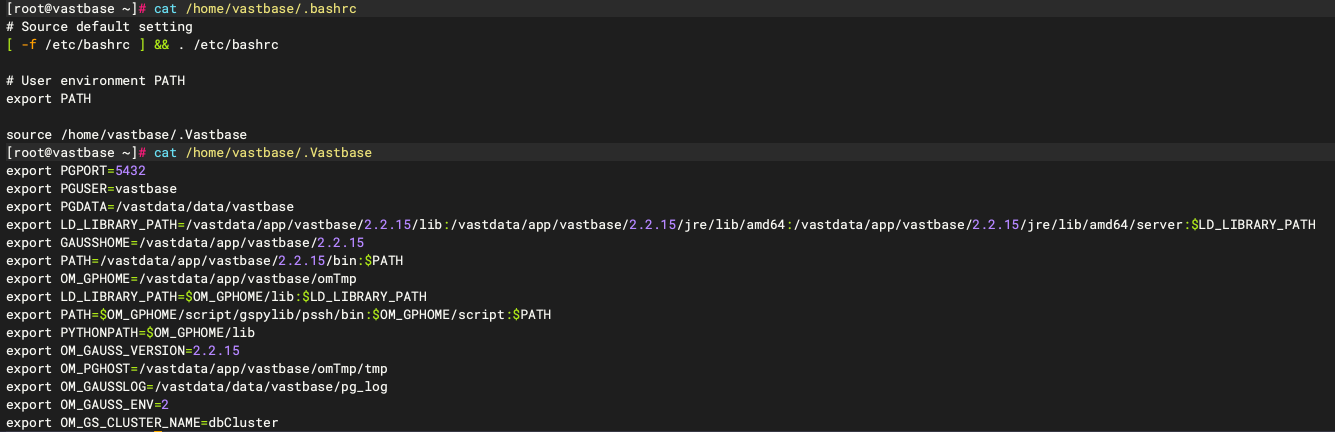
Writing environment variables The configuration file:'/home/vastbase/.bashrc' is successfully updated =============================================================================== Installation complete ---------------
Specify the license path first (if the license path is incorrect, the database fails to start): Write the license path to file /vastdata/data/vastbase/postgresql.conf in the form of license_path='license path'
To initialize the database running environment: source ~/.bashrc
To start, stop, and restart the database: vb_ctl <start/stop/restart>
If the installation is complete, Enter <Enter> to exit:
[vastbase@vastbase:/home/vastbase]$ source ~/.bashrc [vastbase@vastbase:/home/vastbase]$ vb_ctl status [2025-06-09 14:49:10.434][8567][][vb_ctl]: vb_ctl status,datadir is /vastdata/data/vastbase no server running
启动数据库报错:
1 2 3 4 5 6 7 8 9 10 11 12 13 14 15 16 17 18 19
[vastbase@vastbase:/home/vastbase]$ vb_ctl start [2025-06-09 14:55:36.611][9962][][vb_ctl]: vb_ctl started,datadir is /vastdata/data/vastbase [2025-06-09 14:55:36.664][9962][][vb_ctl]: waiting for server to start...
... ... ...
2025-06-09 14:55:36.781 [unknown] [unknown] localhost 139661589746176 0[0:0#0] 0 [BACKEND] LOG: reserved memory for backend threads is: 220 MB 2025-06-09 14:55:36.781 [unknown] [unknown] localhost 139661589746176 0[0:0#0] 0 [BACKEND] LOG: reserved memory for WAL buffers is: 128 MB 2025-06-09 14:55:36.781 [unknown] [unknown] localhost 139661589746176 0[0:0#0] 0 [BACKEND] LOG: Set max backend reserve memory is: 348 MB, max dynamic memory is: 1917 MB 2025-06-09 14:55:36.781 [unknown] [unknown] localhost 139661589746176 0[0:0#0] 0 [BACKEND] LOG: shared memory 7519 Mbytes, memory context 2265 Mbytes, max process memory 10297 Mbytes 2025-06-09 14:55:36.781 [unknown] [unknown] localhost 139661589746176 0[0:0#0] 0 [BACKEND] FATAL: the values of memory out of limit, the database failed to be started, max_process_memory (10297MB) must greater than 2GB + cstore_buffers(512MB) + (udf_memory_limit(200MB) - UDF_DEFAULT_MEMORY(200MB)) + shared_buffers(3871MB) + preserved memory(3996MB) = 10427MB, reduce the value of shared_buffers, max_pred_locks_per_transaction, max_connection, wal_buffers, max_wal_senders, wal_receiver_buffer_size..etc will help reduce the size of preserved memory 2025-06-09 14:55:36.784 [unknown] [unknown] localhost 139661589746176 0[0:0#0] 0 [BACKEND] LOG: FiniNuma allocIndex: 0. [2025-06-09 14:55:37.666][9962][][vb_ctl]: waitpid 9965 failed, exitstatus is 256, ret is 2
[2025-06-09 14:55:37.666][9962][][vb_ctl]: stopped waiting [2025-06-09 14:55:37.666][9962][][vb_ctl]: could not start server Examine the log output.
[vastbase@vastbase:/home/vastbase]$ vb_ctl start [2025-06-09 15:01:37.346][10751][][vb_ctl]: vb_ctl started,datadir is /vastdata/data/vastbase [2025-06-09 15:01:37.403][10751][][vb_ctl]: waiting for server to start...
[2025-06-09 15:01:38.416][10751][][vb_ctl]: done [2025-06-09 15:01:38.416][10751][][vb_ctl]: server started (/vastdata/data/vastbase)
启动成功,查看数据库状态:
1
2
3
4
[vastbase@vastbase:/home/vastbase]$ vb_ctl status
[2025-06-09 15:01:54.074][10919][][vb_ctl]: vb_ctl status,datadir is /vastdata/data/vastbase
vb_ctl: server is running (PID: 10754)
/vastdata/app/vastbase/2.2.15/bin/vastbase
[vastbase@vastbase:/home/vastbase]$ vb_ctl restart [2025-06-09 15:06:32.159][11502][][vb_ctl]: vb_ctl restarted ,datadir is /vastdata/data/vastbase waiting for server to shut down... done server stopped