【纯干货】Oracle 19C RU 19.25 发布,如何快速升级和安装?
大家好,这里是公众号 Lucifer三思而后行,分享一些学习国产数据库路上的知识和经验。
@TOC
前言
今天一早打开邮箱收到 Oracle 的邮件,开头内容如下:
1 | October 15, 2024 |
原来是 Oracle 第四季度补丁发布了!!!
介绍
上班后,打开 MOS 查看了一下,果然更新了:
| 数据库版本 | 补丁类型 | 补丁版本 | 补丁编号 | 发布日期 |
|---|---|---|---|---|
| Oracle 11GR2 | Grid | ** | 15-Oct-2024 | |
| Oracle 11GR2 | Database | ** | 15-Oct-2024 | |
| Oracle 11GR2 | OJVM | 11.2.0.4.241015 (Oct 2024) OJVM Component Patch Set Update | Patch 36878781 | 15-Oct-2024 |
| Oracle 12CR2 | Grid | 12.2.0.1.241015 (Oct 2024) GI Release Update | Patch 36940305 | 15-Oct-2024 |
| Oracle 12CR2 | Database | 12.2.0.1.241015 (Oct 2024) Database Release Update | Patch 36941400 | 15-Oct-2024 |
| Oracle 12CR2 | OJVM | 12.2.0.1.241015 (Oct 2024) OJVM Release Update | Patch 36878737 | 15-Oct-2024 |
| Oracle 19C | Grid | Database Release Update 19.25.0 | Patch 36912597 | 15-Oct-2024 |
| Oracle 19C | Database | GI Release Update 19.25.0 | Patch 36916690 | 15-Oct-2024 |
| Oracle 19C | OJVM | OJVM Release Update 19.25.0 | Patch 36878697 | 15-Oct-2024 |
老样子,11GR2 没有更新 Grid 和 DB 的补丁,其他版本补丁均正常发布。
这里顺带分享一下几个 MOS 补丁的下载链接:
- Patch 6880880
- Assistant: Download Reference for Oracle Database/GI Update, Revision, PSU, SPU(CPU), Bundle Patches, Patchsets and Base Releases (Doc ID 2118136.2)
- Primary Note for Database Proactive Patch Program (Doc ID 888.1)
- Database 11.2.0.4 Proactive Patch Information (Doc ID 2285559.1)
- Database 12.2.0.1 Proactive Patch Information (Doc ID 2285557.1)
- Oracle Database 19c Proactive Patch Information (Doc ID 2521164.1)
有 MOS 账号的小伙伴可以直接点击链接进行下载了。
19.25 RU 补丁安装
环境信息:
| 角色 | IP地址 | 数据库版本 | CDB名 | PDB名 |
|---|---|---|---|---|
| 源端 | 192.168.6.136 | 19.3 | orclcdb | testpdb |
本文数据库环境均使用 Oracle 一键安装脚本部署:
脚本下载:Oracle一键安装脚本
作者微信:Lucifer-0622
环境准备
为了演示补丁安装,使用 Oracle 一键安装脚本快速安装一套 Oracle 19C 无补丁测试环境:
1 | ./OracleShellInstall -lf ens192 `# local ip ifname`\ |
一键安装过程如下:
1 | ███████ ██ ████████ ██ ██ ██ ██ ██ ██ ██ |
安装好的环境为 19C 无补丁数据库版本:
1 | [oracle@rhel8:/home/oracle]$ sqlplus -v |
下面演示一下 Oracle 19C RU 19.25 补丁的安装步骤。
README
首先需要查看补丁的 README 文件(解压补丁后即可获得),其中补丁的前置要求如下:
- You must use the OPatch utility version 12.2.0.1.43 or later to apply this patch.
- If you are using a Data Guard Physical Standby database, you must install this patch on both the primary database and the physical standby database.
- If this is an Oracle RAC environment, install this patch using the OPatch rolling (no downtime) installation method as this patch is rolling RAC installable.
- If this is not a RAC environment, shut down all instances and listeners associated with the Oracle home that you are updating.
翻译一下就是:
- OPatch 版本大于 12.2.0.1.43
- 有 DG 的环境,DG 也要打补丁
- RAC 环境可以滚动升级
- 单机环境需要关闭所有 oracle 相关的服务
升级 OPatch
查看当前数据库的 Opatch 版本:
1 | [oracle@rhel8:/home/oracle]$ opatch version |
opatch 版本低于 43,需要下载最新的 OPatch 补丁替换,在 Patch 6880880 下载对应版本的补丁:
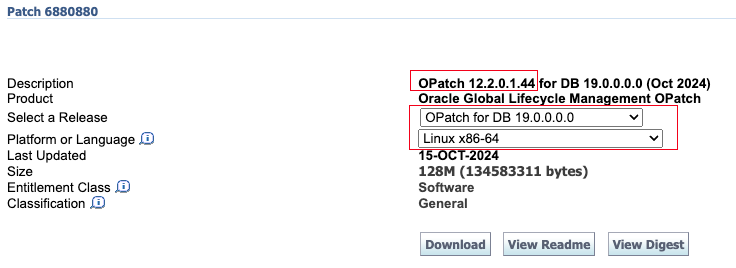
下载后上传到数据库主机,解压替换即可(这一步不需要停机,可以在线操作):
1 | ## 这里我上传到 /soft 目录,所以需要对目录进行授权 |
升级完 OPatch 版本之后,需要进行安装前补丁冲突检查。
冲突检查
首先需要上传 RU 补丁并解压:
1 | ## 这里我上传到 /soft 目录,所以需要对目录进行授权 |
到这都没问题的话,就可以协商停机时间进行补丁升级了。
补丁升级
前置工作都做完之后,补丁升级步骤其实很简单,RAC 滚动升级也可以使用这种方式:
1 | ## 关闭数据库 |
19.25 RU 补丁安装比较慢,要耐心等待,这里安装完最后还有一个提示(这个是正常的提示,可以忽略):
1 | Sub-set patch [29517242] has become inactive due to the application of a super-set patch [36912597]. |
这个 29517242 补丁就是我们安装好 19C 数据库之后默认安装的补丁版本:
1 | 29517242;Database Release Update : 19.3.0.0.190416 (29517242) |
通过查看相关文档可以发现:
1 | For information about Release Updates please read Note:2285040.1 . |
软件补丁安装完成后,对数据库也要执行 datapatch,需要先打开数据库:
1 | [oracle@rhel8:/soft/36912597]$ sas |
执行 datapatch:
1 | ## 这一步是可选的,执行后会运行一系列环境和数据库检查,确保 datapatch 能够安装成功 |
查看补丁版本:
1 | [oracle@rhel8:/home/oracle]$ sqlplus -v |
至此,数据库 19.25 补丁安装完成。
一键安装补丁
如果你是新安装一套数据库,需要安装最新补丁 19.25,使用 Oracle 一键安装脚本可以轻松完成。
脚本下载:Oracle一键安装脚本
作者微信:Lucifer-0622
这里演示一下 19C 一键安装,同时安装 DB 和 OJVM 补丁的命令:
1 | # 提前上传好安装包和安装脚本即可 |
安装过程如下:
1 | ███████ ██ ████████ ██ ██ ██ ██ ██ ██ ██ |
打补丁 + CDB 架构安装还是比较慢的,查看安装后的版本信息:
1 | [oracle@KeyarchOS:/home/oracle]$ sqlplus -v |
可以看到数据库补丁以及 OJVM 补丁均已成功安装,数据库内部也可以查看补丁安装记录:
1 | set line2222 pages1000 tab off |
至此,Oracle 一键安装演示结束。
写在最后
Oracle 数据库补丁安装其实并不难,官方提供的 README 已经一目了然,如果大家都可以耐心好好读一读,相信一定会受益匪浅。
