9) Why is my SYSDATE / SYSTIMESTAMP time not the same as my system clock on Unix? To debug situations inwhich you have a unexplained difference between the oracle SYSDATE / SYSTIMESTAMP and the system time you see on Unix, use the following method:
telnet/ssh to the Unix box connect using sqlplus in the telnet session:
1) once through the listener using a tnsnames alias $sqlplus user/password @ [tnsnames alias] SQL>select to_char(sysdate,'DD-MON-YY HH24:MI:SS') from dual;
2) once through a "local" ORACLE_SID connection $env | egrep 'ORACLE_SID' $sqlplus user/password SQL>select to_char(sysdate,'DD-MON-YY HH24:MI:SS') from dual;
Check that the timein the banner of sqlplus ( SQL*Plus: Release 10.1.0.4.0 - Production on Wo Jan 11 15:05:46 2006 ) is reflecting the time based on the current TZ setin the Unix (!) session.
If the results are different this means that the listener is started with a different TZ setting than you current user environment. To resolve this simply stop and start listener with the TZ setting you want to use. Make sure you double check what listener you are using when having multiple listeners. For more information about the TZ variable please see your OS documentation.
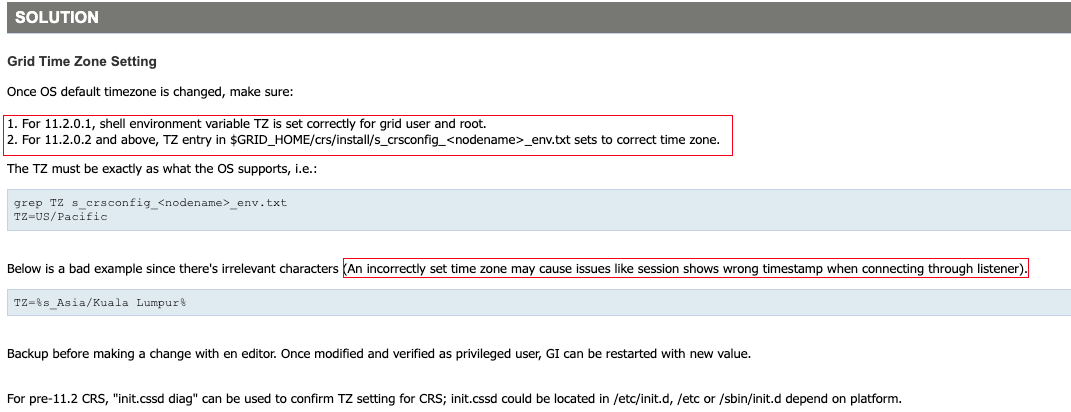
11)How do I see & set the TZ environment variable in a RAC environment note 1390015.1 Incorrect SYSDATE shown when connected via Listener in RAC
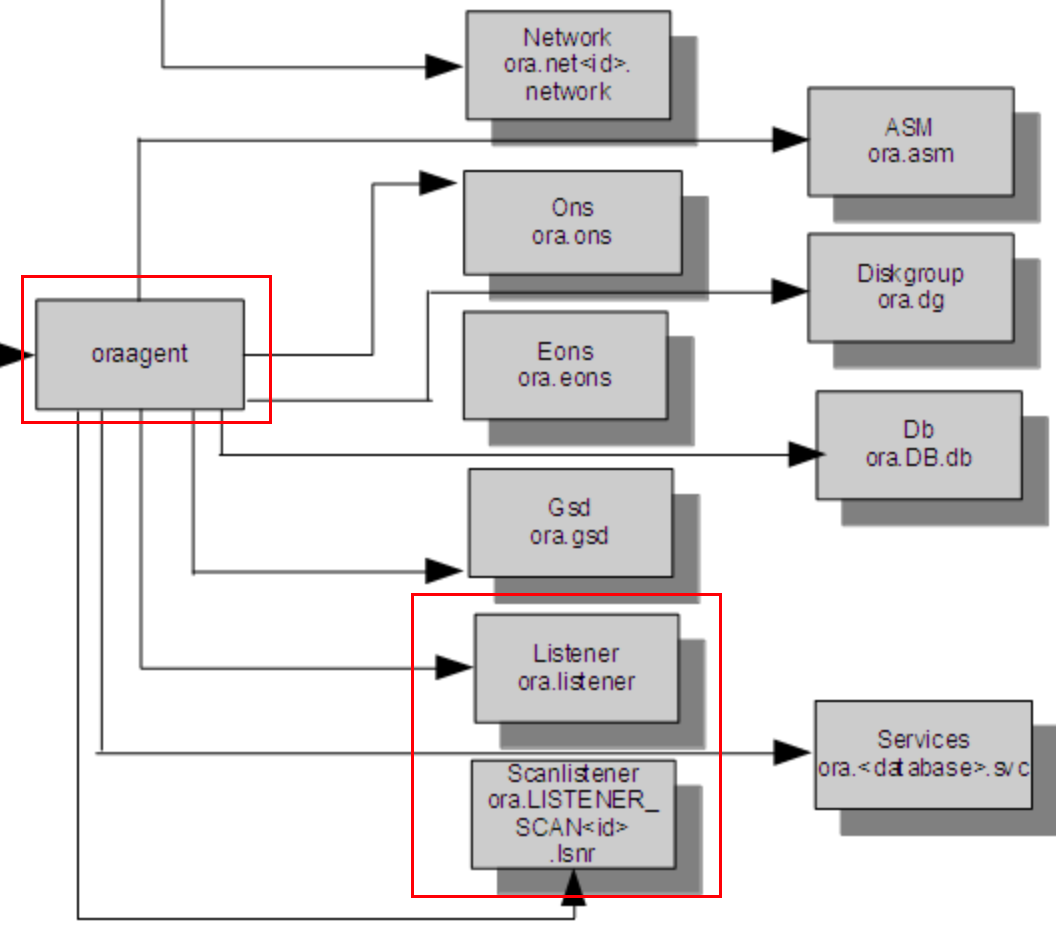
Note: If you stop and start a RAC database and/or listener "manual" on Unix (= with sqlplus or lsnrctl) then the above setting is NOT used but the TZ setting of the OS user that starts the database/listener, see point 9)
How to use multiple timezones for current_timestamp ( NOT for sysdate !) please see Note 1531653.1 How to use multiple timezones with one Oracle RAC database .
LSNRCTL for Linux: Version 11.2.0.4.0 - Production on 21-AUG-2024 12:28:52
Copyright (c) 1991, 2013, Oracle. All rights reserved.
Connecting to (DESCRIPTION=(ADDRESS=(PROTOCOL=IPC)(KEY=LISTENER))) STATUS of the LISTENER ------------------------ Alias LISTENER Version TNSLSNR for Linux: Version 11.2.0.4.0 - Production Start Date 21-AUG-2024 13:13:32 Uptime 0 days 0 hr. 15 min. 20 sec Trace Level off Security ON: Local OS Authentication SNMP OFF Listener Parameter File /u01/app/11.2.0/grid/network/admin/listener.ora Listener Log File /u01/app/grid/diag/tnslsnr/rocky9-01/listener/alert/log.xml Listening Endpoints Summary... (DESCRIPTION=(ADDRESS=(PROTOCOL=ipc)(KEY=LISTENER))) (DESCRIPTION=(ADDRESS=(PROTOCOL=tcp)(HOST=192.168.6.160)(PORT=1521))) (DESCRIPTION=(ADDRESS=(PROTOCOL=tcp)(HOST=192.168.6.162)(PORT=1521))) Services Summary... Service "+ASM" has 1 instance(s). Instance "+ASM1", status READY, has 1 handler(s) for this service... Service "lucifer" has 1 instance(s). Instance "lucifer1", status READY, has 1 handler(s) for this service... Service "luciferXDB" has 1 instance(s). Instance "lucifer1", status READY, has 1 handler(s) for this service... The command completed successfully
通过上面的输出可以发现一个很诡异的现象:
1 2 3 4 5
## 查看监听的时间是 12:30,也就是越南时间 LSNRCTL for Linux: Version 11.2.0.4.0 - Production on 21-AUG-2024 12:30:35
## 然而监听启动时间是 13:13,也就是北京时间,明显是错误的 Start Date 21-AUG-2024 13:13:32
## 系统时间 [grid@rocky9-01:/home/grid]$ date Wed Aug 21 01:07:01 PM +07 2024 ## 监听时间 [grid@rocky9-01:/home/grid]$ lsnrctl stat
LSNRCTL for Linux: Version 11.2.0.4.0 - Production on 21-AUG-2024 13:07:02
Copyright (c) 1991, 2013, Oracle. All rights reserved.
Connecting to (DESCRIPTION=(ADDRESS=(PROTOCOL=IPC)(KEY=LISTENER))) STATUS of the LISTENER ------------------------ Alias LISTENER Version TNSLSNR for Linux: Version 11.2.0.4.0 - Production Start Date 21-AUG-2024 13:05:03 Uptime 0 days 0 hr. 1 min. 59 sec Trace Level off Security ON: Local OS Authentication SNMP OFF Listener Parameter File /u01/app/11.2.0/grid/network/admin/listener.ora Listener Log File /u01/app/grid/diag/tnslsnr/rocky9-01/listener/alert/log.xml Listening Endpoints Summary... (DESCRIPTION=(ADDRESS=(PROTOCOL=ipc)(KEY=LISTENER))) (DESCRIPTION=(ADDRESS=(PROTOCOL=tcp)(HOST=192.168.6.160)(PORT=1521))) (DESCRIPTION=(ADDRESS=(PROTOCOL=tcp)(HOST=192.168.6.162)(PORT=1521))) Services Summary... Service "+ASM" has 1 instance(s). Instance "+ASM1", status READY, has 1 handler(s) for this service... Service "lucifer" has 1 instance(s). Instance "lucifer1", status READY, has 1 handler(s) for this service... Service "luciferXDB" has 1 instance(s). Instance "lucifer1", status READY, has 1 handler(s) for this service... The command completed successfully
可以看到监听时间和系统时间已经保持一致,再次验证数据库时间:
1
2
3
4
5
6
7
8
9
10
11
12
13
-- 使用 TNS 连接数据库查询时间时区为:越南 +0700 SQL>select SYSTIMESTAMP from dual;
open (ENVFILE, ">$env_file") ordie"Can't create $env_file: $!";
print ENVFILE "### This file can be used to modify the NLS_LANG environment" . " variable, which determines the charset to be used for messages.\n" . "### For example, a new charset can be configured by setting" . " NLS_LANG=JAPANESE_JAPAN.UTF8 \n" . "### Do not modify this file except to change NLS_LANG," . " or under the direction of Oracle Support Services\n\n";
# get TZ if ($CFG->defined_param('TZ')) { my$tz = $CFG->params('TZ'); $tz =~ s/'//g; # remove single quotes print ENVFILE "TZ=" . $tz . "\n"; } ... ... ... }
# pull all parameters defined in crsconfig_params and s_crsconfig_defs (if # it exists) as variables in Perl my$paramfile_default = catfile (dirname ($0), "crsconfig_params");
our$PARAM_FILE_PATH = $paramfile_default;
# Read the config files and set up the configuration data for # subsequent processing my$cfg = crsconfig_lib->new(IS_SIHA => FALSE, paramfile =>$PARAM_FILE_PATH, osdfile =>$defsfile, addfile =>$addparams, crscfg_trace => TRUE, CRSDelete =>$g_delete, DEBUG =>$DEBUG, HAS_USER =>$SUPERUSER, HOST =>$HOST, UPGRADE =>$UPGRADE, UNLOCK =>$g_unlock, unlock_crshome =>$unlock_crshome, CRSPatch =>$g_patch, DOWNGRADE =>$DOWNGRADE, oldcrshome =>$oldcrshome, oldcrsver =>$oldcrsver, force =>$g_force, deinstall =>$g_deinstall, keepdg =>$g_keepdg, lastnode =>$g_lastnode, REMOTENODE =>$REMOTENODE, destcrshome =>$destcrshome );
## $GRID_HOME/cfgtoollogs/oui/installActions2024-08-15_04-05-22PM.log INFO: The default response file generated with recorded values is /u01/app/11.2.0/grid/inventory/response/oracle.crs_Complete.rsp INFO: -destinationFile option was not provided. Saving the default response file as /u01/app/11.2.0/grid/inventory/response/oracle.crs_Complete.rsp INFO: Recording the installation in file /u01/app/11.2.0/grid/inventory/response/oracle.crs_Complete.rsp.
INFO: Reading global variables from file /soft/grid/install/../stage/globalvariables/globalvar.xml
INFO: ---------------------------------------------------------------------------------------------------- INFO: PROPERTY VALUE INFO: ---------------------------------------------------------------------------------------------------- INFO: oracle_install_crs_Timezone Asia/Shanghai INFO: adding the variable oracle_install_crs_Timezone to command line args table INFO: Setting variable 'oracle_install_crs_Timezone' to 'Asia/Shanghai'. Received the value from the command line.
## $GRID_HOME/install/root_rocky9-01_2024-08-15_16-14-17.log Using configuration parameter file: /u01/app/11.2.0/grid/crs/install/crsconfig_params
## $GRID_HOME/cfgtoollogs/crsconfig/rootcrs_rocky9-01.log 2024-08-15 16:14:17: The configuration parameter file /u01/app/11.2.0/grid/crs/install/crsconfig_params is valid 2024-08-15 16:14:17: ### Printing the configuration values from files: 2024-08-15 16:14:17: /u01/app/11.2.0/grid/crs/install/crsconfig_params 2024-08-15 16:14:17: paramfile=/u01/app/11.2.0/grid/crs/install/crsconfig_params